This pest control equipment depreciation schedule is an Excel workbook for organizing asset details, in-service dates, acquisition costs, salvage values, useful lives, depreciation methods, and current book values.
Use the XLSX file to maintain an equipment register, calculate depreciation through a selected as-of date, identify entries that need correction, and view financial totals by equipment category.
How this workbook can help
- Keep equipment details and depreciation figures together in one structured schedule.
- Calculate accumulated depreciation and current book value from consistent asset inputs.
- Track active, retired, and held-for-review equipment through a selected as-of date.
- Summarize original cost, depreciation, book value, and next-month estimates by category.
What is in the file
How to get started
1. Set the schedule assumptions
Open the Assumptions sheet and confirm the as-of date, maximum useful life, maximum equipment amount, and high-value threshold.
2. Enter each equipment asset
Use the yellow cells on the Equipment sheet to enter a unique asset ID, equipment details, acquisition and in-service dates, cost, salvage value, useful life, method, and status.
3. Check the calculated schedule
Review the effective-through date, months depreciated, depreciable base, accumulated depreciation, current book value, next-month estimate, and any displayed prompt.
4. Use the summary totals
Open the Summary sheet to view asset counts, financial totals, flagged entries, and current book value by pest control equipment category.
What the Equipment Schedule Tracks
The Equipment sheet provides 100 asset rows for recording pest control equipment such as sprayers, dusters, inspection tools, heat equipment, vehicle equipment, and service equipment. Each row can include an asset ID, equipment name, service site, responsible person, acquisition date, in-service date, cost, salvage value, useful life, method, status, and disposition date.
How the Depreciation Calculations Work
The workbook calculates depreciation using completed months from the in-service date through the effective-through date. For an asset marked Retired with a disposition date, that date is limited to the earlier of the disposition date or the schedule's as-of date.
Under straight-line depreciation, the depreciable base equals acquisition cost less salvage value and is allocated evenly across the useful life. Under double-declining depreciation, the balance declines monthly at twice the straight-line rate without reducing book value below the entered salvage value.
Worked Scenario for a Fictional Sprayer
Input: A fictional sprayer costs $6,000, has a $600 salvage value, enters service on September 11, 2024, uses a five-year straight-line life, and is measured through September 11, 2026. Result: The workbook calculates a $5,400 depreciable base, 24 completed months, $2,160 of accumulated depreciation, a $3,840 current book value, and a $90 next-month estimate. Interpretation: Forty percent of the depreciable base has been allocated over 24 of the scheduled 60 months. Next decision: Keep the asset marked Active if it remains in service and carry the $90 estimate into the next monthly equipment schedule.
Common Errors and Solutions
The Review Prompt column identifies entries that conflict with the schedule's input rules.
- If an asset ID is duplicated, assign a unique ID to each equipment record.
- If required fields are blank, complete the equipment details, dates, cost, useful life, method, and status.
- If acquisition cost is zero or negative, correct the cost entry.
- If salvage value exceeds acquisition cost, correct the salvage value or acquisition cost.
- If the in-service date is earlier than the acquisition date, verify and correct the dates.
- If a retired asset lacks a disposition date, add the date. If a non-retired asset has one, clear the date or correct the status.
Schedule Limits and Boundaries
The prepared schedule covers rows 6 through 105, providing space for 100 assets. It supports only straight-line and double-declining methods and uses completed-month timing rather than daily proration. The configured date validation range is January 1, 1976, through December 31, 2036.
The Assumptions sheet initially sets a 30-year maximum useful life and a $1,000,000 maximum equipment amount. Those limits are editable assumptions, while the available categories and methods are fixed by the workbook's validation lists.
Workbook and blank spreadsheet comparison
Use the prepared workbook when its verified fields and calculations fit the pest-control task. Start with a blank spreadsheet when you need a different model and can build and test every field and formula yourself.
| Method | Setup | Calculations and review | Practical fit |
|---|---|---|---|
| This Excel workbook | Use the prepared structure in the validated file | Review the documented calculations and results | Local editable pest-control workflow supported by the workbook |
| Blank spreadsheet | Create the structure yourself | Build and test every formula and check | A custom model built from scratch |
Using the Summary for Equipment Planning
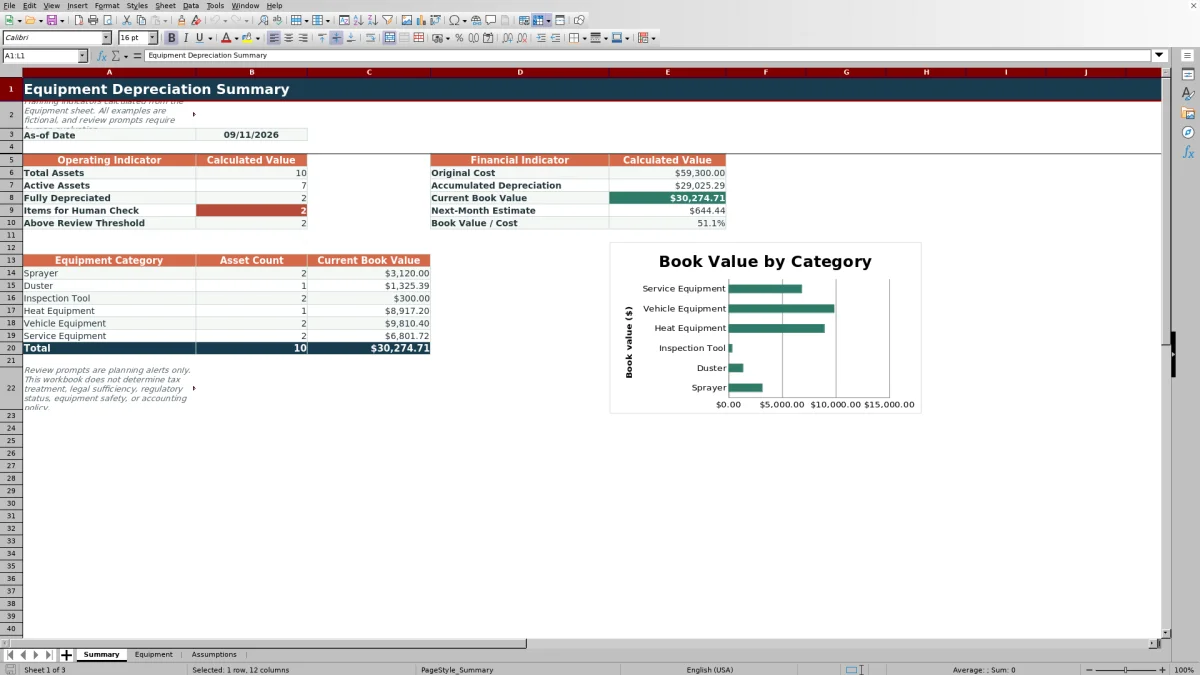
The Summary sheet reports total assets, active assets, fully depreciated assets, flagged items, and assets above the configured threshold. Its financial indicators include original cost, accumulated depreciation, current book value, next-month estimate, and book value as a percentage of cost.
Category rows show asset count and current book value for the six supported equipment categories. The included chart uses those category book values to provide a visual breakdown of the recorded equipment balance.
Frequently asked questions
Which pest control equipment categories are included?
The workbook includes Sprayer, Duster, Inspection Tool, Heat Equipment, Vehicle Equipment, and Service Equipment as validated category choices.
Which depreciation methods can I select?
You can select Straight-Line or Double-Declining. Straight-line allocates cost less salvage evenly by completed month, while double-declining applies twice the straight-line rate with a salvage-value floor.
How does the workbook handle retired equipment?
When an asset is marked Retired and has a disposition date, depreciation runs through the earlier of that disposition date or the workbook's as-of date.
Why does the calculated book value stop at salvage value?
The formulas use the entered salvage value as a floor, so calculated current book value does not fall below that amount.
What information appears on the Summary sheet?
The Summary sheet displays asset counts, original cost, accumulated depreciation, current book value, next-month estimates, flagged-item counts, threshold counts, category totals, and a category book-value chart.
Editorial responsibility

Maya EllisService workflow editor

Noah BennettWorkbook structure and operations