This pest control business plan template is an Excel workbook for organizing market assumptions, service revenue, staffing, operating costs, startup costs, and milestones in one planning file.
Replace the fictional estimates with your own figures, then use the formula-generated projections and summary indicators to prepare an owner- or lender-facing plan.
How this workbook can help
- Turn expected service volumes and prices into planned monthly revenue.
- Separate recurring staffing and operating costs from one-time startup costs.
- Review operating results, cumulative results, ending cash, capacity, and market capture.
- Track milestone dates, assigned responsibilities, statuses, budgets, actual amounts, and variances.
What is in the file
How to get started
1. Update the assumptions
Enter the plan start date, projection length, growth rates, variable cost share, available funds, startup contingency, labor capacity estimates, and target market figures.
2. Enter the planning lines
List expected pest control services, monthly job volumes, prices, staffing costs, operating costs, and startup purchases on the Plan Inputs sheet.
3. Review the calculated results
Use the Monthly Projection and Summary sheets to examine revenue, costs, operating results, ending cash, capacity utilization, market capture, and the startup funding gap.
4. Maintain the milestone schedule
Add target dates, responsibilities, statuses, budgets, and actual amounts. Use the completed workbook figures to support the corresponding sections of the written business plan.
What the Pest Control Business Plan Template Covers
The five-sheet structure connects detailed planning inputs with monthly financial projections, headline indicators, and implementation milestones. It is designed for a pest control company that needs to organize expected service sales, staffing, recurring costs, startup spending, available funds, capacity, and customer targets.
The fictional entries demonstrate the intended format but are not market facts or promised results. Replace them with estimates supported by the proposed service area and operating model.
Building Service, Staffing, and Cost Assumptions
The Plan Inputs sheet provides 100 planning lines. Each line can be categorized as Service Revenue, Staffing, Operating Cost, or Startup Cost. Service Revenue lines calculate monthly revenue from quantity multiplied by unit amount. Staffing and Operating Cost lines use the same calculation to produce monthly fixed cost, while Startup Cost lines produce one-time startup amounts.
- Use jobs per month for recurring service volume and enter the expected amount per job.
- Use full-time role or monthly item for recurring staffing and operating expenses when those units fit the estimate.
- Use each for individual startup purchases when that unit fits the estimate.
- Assign a start date, responsibility, and status to keep each planning line organized.
Worked Pest Control Business Plan Scenario
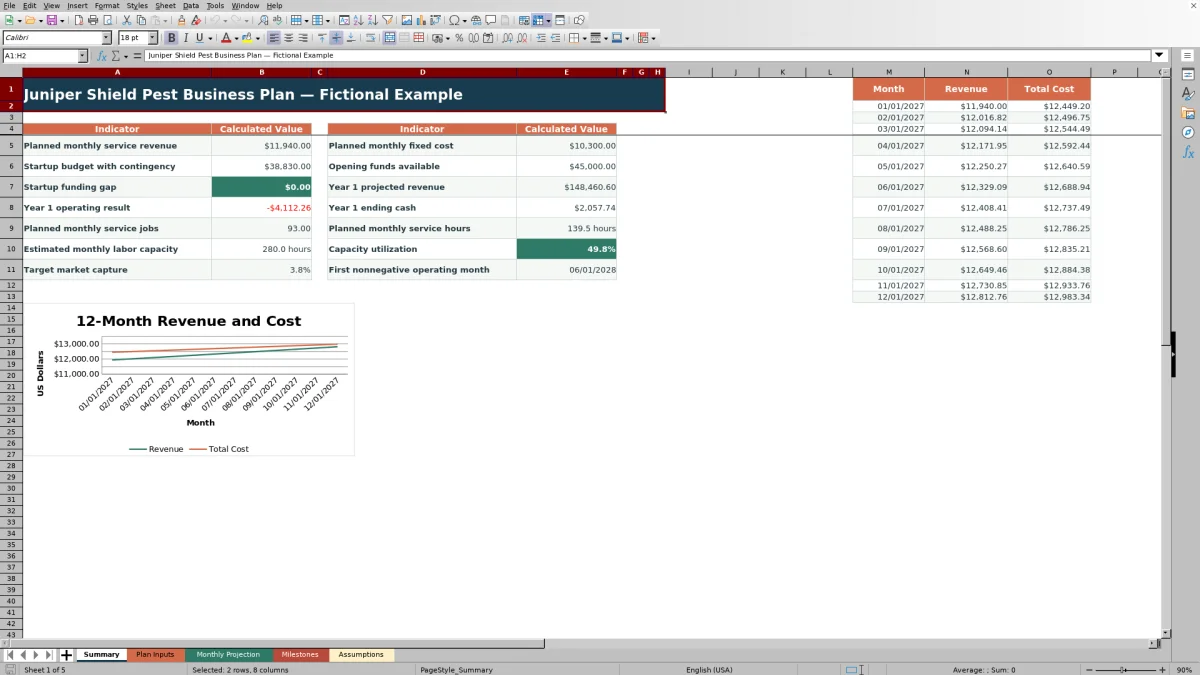
Consider a fictional month with 45 perimeter monitoring jobs at $128, 18 rodent inspection visits at $185, and 30 mosquito yard visits at $95. The calculations are $5,760, $3,330, and $2,850, so Month 1 base revenue is $11,940.
If entered staffing and operating lines total $7,000 per month and the variable cost share is 18%, variable cost is $2,149.20. The Month 1 operating result is $2,790.80: $11,940 minus $7,000 minus $2,149.20.
Now assume $20,000 of startup costs, a 10% startup contingency, $15,000 of opening cash, and $30,000 of owner funds. Startup costs with contingency equal $22,000, and projected Month 1 ending cash is $25,790.80. The result indicates a positive first-month operating result while showing how startup spending reduces available cash. The next decision is to test lower job volume or higher fixed costs before finalizing the funding request.
Reading the Monthly Projection and Summary
The Monthly Projection uses the selected start date and projection period to generate monthly rows. Revenue and fixed costs grow gradually according to their annual assumptions, while variable cost remains a selected share of projected revenue.
The Summary reports Year 1 revenue, Year 1 operating result, Year 1 ending cash, a startup funding gap, service volume, labor capacity, capacity utilization, target market capture, and the first nonnegative operating month. That month refers to the first nonnegative monthly operating result, not full recovery of startup spending or cumulative profitability.
Common Errors and Solutions
Check category, quantity, and unit amount first when a planning line does not produce a calculated value. The formulas require all three fields, and the selected plan area determines whether the result appears as revenue, fixed cost, or startup cost.
- If projection rows are blank, confirm the plan start date and projection length on the Assumptions sheet.
- If ending cash is blank, confirm opening cash, owner funds, startup contingency, and at least one completed Startup Cost line.
- If costs appear in the wrong calculated column, correct the Plan Area selection.
- If months after the selected projection period are blank, no correction is needed; unused prepared rows remain empty by design.
- If capacity utilization appears unrealistic, review staffing quantities, productive hours per role, service volume, and average labor hours per service.
Workbook and blank spreadsheet comparison
Use the prepared workbook when its verified fields and calculations fit the pest-control task. Start with a blank spreadsheet when you need a different model and can build and test every field and formula yourself.
| Method | Setup | Calculations and review | Practical fit |
|---|---|---|---|
| This Excel workbook | Use the prepared structure in the validated file | Review the documented calculations and results | Local editable pest-control workflow supported by the workbook |
| Blank spreadsheet | Create the structure yourself | Build and test every formula and check | A custom model built from scratch |
Limits of the Workbook
This file is a planning model rather than a complete lender package. It does not include a dedicated debt schedule, balance sheet, depreciation schedule, or full written market and company narrative. Its customer-market calculation is limited to comparing a target number of active customers with an entered serviceable-household estimate.
The formulas produce scenarios from entered assumptions; they do not verify demand, prices, costs, financing availability, or future performance. Use the workbook to support the financial and milestone portions of the plan, and add the written information requested by the intended audience.
Frequently asked questions
Is this Excel workbook a complete pest control business plan?
It supports the financial, operating, capacity, market-target, and milestone portions of a plan. A complete owner- or lender-facing package may also need a separate written company description, local market analysis, competitive discussion, sales strategy, and explanation of assumptions.
How many months can the projection cover?
The prepared projection supports 12 through 120 months. The fictional example is set to 60 months, and months beyond the selected period remain blank.
How does the workbook calculate revenue and costs?
Each Service Revenue line multiplies quantity by unit amount to calculate monthly base revenue. Staffing and Operating Cost lines use the same method for monthly fixed costs. Variable cost is calculated as a selected share of projected revenue, and Startup Cost lines calculate one-time startup spending.
Can the template show a startup funding gap?
Yes. The Summary compares startup costs with contingency against opening cash and owner funds. If the startup budget is greater than those available funds, the difference appears as the startup funding gap.
What does the first nonnegative operating month mean?
It is the first projected month in which revenue minus fixed and variable costs is zero or positive. It does not indicate that cumulative startup spending has been recovered.
Editorial responsibility

Maya EllisService workflow editor

Noah BennettWorkbook structure and operations