The Wildlife Removal Estimate Spreadsheet for Excel is an XLSX workbook for building sales estimates by pest concern, access location, device or product, labor, repair materials, monitoring visits, mileage, and contingency.
It includes 100 prepared estimate rows, editable pricing assumptions, calculated totals and valid-through dates, plus a summary of estimate counts, values, statuses, and sent estimates expiring within seven days.
How this workbook can help
- Build consistent wildlife removal estimates from species, access, equipment, labor, repair, monitoring, mileage, and contingency inputs.
- Keep rates, date limits, validity periods, pricing choices, and entry limits together on an editable assumptions sheet.
- Track customers, service sites, technicians, routes, responsibilities, scope notes, and estimate statuses in one register.
- Monitor prepared, open, sent, accepted, and expiring estimates through calculated summary indicators.
What is in the file
How to get started
1. Set the pricing assumptions
Open the Assumptions sheet and update the yellow cells for dates, rates, estimate validity, entry limits, wildlife concerns, access locations, services, devices, responsibilities, and statuses.
2. Enter the estimate scope
On the Estimates sheet, add an estimate ID, date, customer, service site, pest concern, access location, service, assigned staff, device quantity, labor hours, repair materials, monitoring visits, travel miles, responsibility, contingency rate, and scope notes.
3. Check the calculated amounts
Confirm the species fee, access factor, device amount, labor amount, monitoring amount, mileage amount, subtotal, contingency amount, estimate total, and valid-through date.
4. Update the status and summary
Assign Draft, Sent, Accepted, Declined, or On Hold as appropriate, then use the Summary sheet to check estimate counts, values, status distribution, and sent estimates expiring within seven days.
How the Wildlife Estimate Pricing Structure Works
The selected pest concern and access location look up a species fee and access factor. Device quantity, labor hours, monitoring visits, and travel miles feed their respective amount columns, while repair materials is entered as a direct amount.
The workbook uses editable assumptions for rates and lookup choices. Calculated values then feed the subtotal, contingency amount, estimate total, and valid-through date.
Worked Wildlife Removal Estimate Scenario
Consider a fictional estimate with 4.5 labor hours, two monitoring visits, and 18 travel miles. Using the supplied assumptions of $145 per labor hour, $95 per monitoring visit, and $1.25 per mile, the input → result calculation produces $652.50 for labor, $190.00 for monitoring, and $22.50 for mileage.
Those three components total $865.00 before the species fee, device amount, repair materials, access factor, and contingency are reflected in the complete estimate. This result shows the effort-and-travel portion of the scope; the next decision is to confirm the wildlife concern, access location, device quantity, repair materials, and contingency before changing the estimate status.
Structured Entry and Validation Controls
The Estimates sheet provides validated entry ranges for wildlife concern, access location, service, technician, route, device or product, responsibility, and status. Date validation uses the earliest and latest estimate dates stored on the Assumptions sheet.
Numeric validation also controls device quantity, labor hours, repair materials, monitoring visits, travel miles, and contingency rates. The limits come from the workbook settings or linked helper ranges, helping keep entries within the configured operating bounds.
Sales Status and Estimate Value Tracking
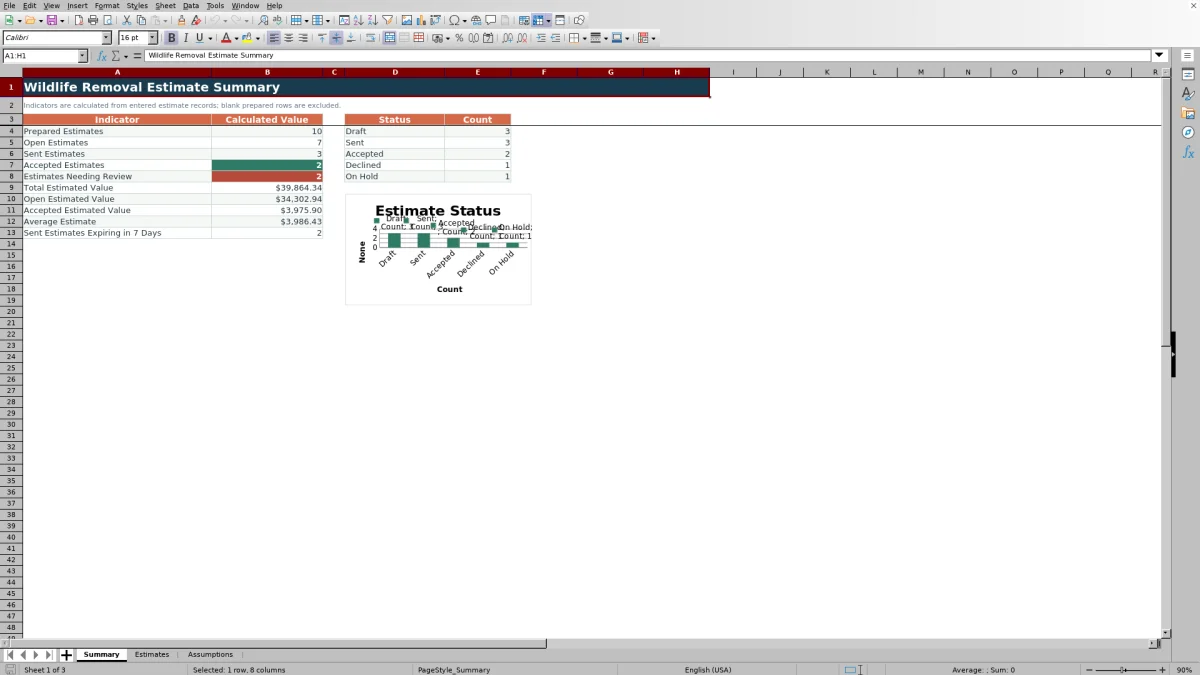
The Summary sheet presents a sales snapshot based on populated estimate records. Open estimates combine Draft, Sent, and On Hold statuses, while separate indicators report prepared, sent, and accepted counts.
Value indicators include total estimated value, open estimated value, accepted estimated value, and average estimate. A separate calculation identifies Sent estimates with valid-through dates falling between the configured as-of date and the following seven days.
Common Errors and Solutions
- Common correction: If calculated cells remain blank, confirm that the row has an Estimate ID in column A because the amount formulas exclude blank prepared rows.
- If a lookup amount is blank, select a listed pest concern, access location, or device rather than pasting text that does not match the Assumptions choices.
- If an estimate date is rejected, compare it with the editable earliest and latest estimate dates.
- If a status count appears unexpected, confirm that the entry uses Draft, Sent, Accepted, Declined, or On Hold exactly as listed.
Workbook Limits and Appropriate Use
The designed limits include 100 prepared estimate rows, from row 4 through row 103, and one device or product field per estimate row. A scope requiring several separately priced devices may need consolidation before entry or an adapted workbook layout.
The included prices, dates, limits, names, routes, sites, and choices are fictional planning inputs. Results depend on the values maintained on the Assumptions sheet and the scope entered for each estimate.
Workbook and blank spreadsheet comparison
Use the prepared workbook when its verified fields and calculations fit the pest-control task. Start with a blank spreadsheet when you need a different model and can build and test every field and formula yourself.
| Method | Setup | Calculations and review | Practical fit |
|---|---|---|---|
| This Excel workbook | Use the prepared structure in the validated file | Review the documented calculations and results | Local editable pest-control workflow supported by the workbook |
| Blank spreadsheet | Create the structure yourself | Build and test every formula and check | A custom model built from scratch |
Frequently asked questions
Can the wildlife removal pricing rates be changed?
Yes. The Assumptions sheet contains editable labor, monitoring, mileage, contingency, validity, date, threshold, lookup, and entry-limit values used by the estimate formulas and validation rules.
How many wildlife removal estimates can the workbook hold?
The Estimates sheet contains 100 prepared rows, covering rows 4 through 103. Summary calculations use that same estimate range.
Which estimate amounts are calculated automatically?
The calculated fields include Species Fee, Access Factor, Device Amount, Labor Amount, Monitoring Amount, Mileage Amount, Subtotal, Contingency Amount, Estimate Total, and Valid Through.
How is the valid-through date calculated?
The workbook adds the editable Estimate Validity period from the Assumptions sheet to the entered Estimate Date.
Which estimate statuses are available?
The configured statuses are Draft, Sent, Accepted, Declined, and On Hold. The Summary sheet counts each status and uses the relevant statuses to calculate open and accepted estimate indicators.
Editorial responsibility

Maya EllisService workflow editor

Noah BennettWorkbook structure and operations