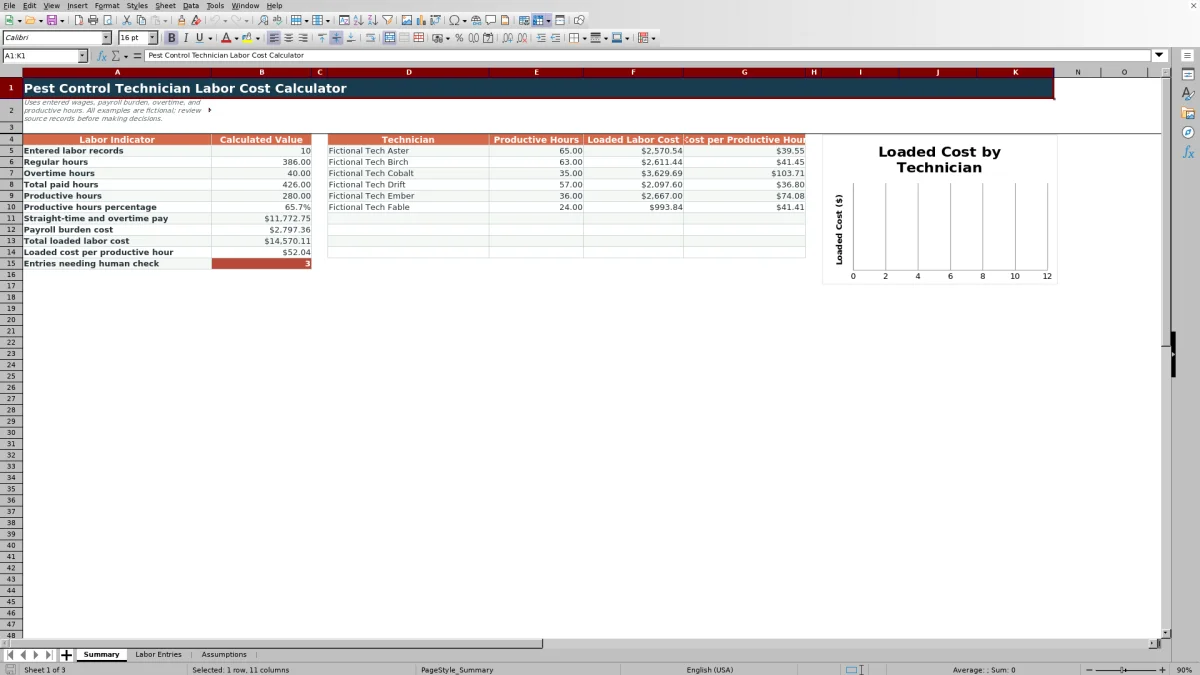
This pest control technician labor cost calculator is an Excel workbook for estimating the full labor cost of technician hours. It combines regular wages, overtime pay, payroll burden, and productive hours to calculate loaded labor cost and loaded cost per productive hour.
The XLSX includes editable technician assumptions, 100 labor-entry rows, technician summaries, input validation, calculated checks, and a chart comparing loaded labor cost. Its included technician names, routes, responsibilities, and examples are fictional.
How this workbook can help
- Calculate regular pay, overtime pay, payroll burden, and total loaded labor cost from one technician-period entry.
- Measure loaded cost per productive hour and productive hours as a percentage of total paid hours.
- Compare productive hours, loaded labor cost, and cost per productive hour across technicians.
- Use validation rules and calculated check messages to identify missing, invalid, or unresolved entries.
What is in the file
How to get started
1. Set up technician assumptions
Open Assumptions and replace the fictional technician details with the appropriate names, base hourly wages, payroll burden rates, overtime multipliers, and active statuses. Update the editable targets, limits, routes, entry statuses, and responsibility choices as needed.
2. Enter technician labor records
In Labor Entries, add one record per technician and period. Complete the week ending date, technician, route, regular hours, overtime hours, productive hours, responsibility, and entry status.
3. Check the calculated costs
Read across each entry to see the retrieved wage assumptions, regular pay, overtime pay, payroll burden cost, loaded labor cost, cost per productive hour, productive hours percentage, and any calculated check message.
4. Use the summary results
Open Summary to examine total paid and productive hours, payroll costs, total loaded labor cost, loaded cost per productive hour, technician comparisons, and the loaded labor cost chart.
What the Excel labor cost calculator measures
The workbook calculates the cost of technician labor beyond the base hourly wage. Each labor entry combines regular hours, overtime hours, productive hours, and technician-specific assumptions. The resulting measures include regular pay, overtime pay, payroll burden cost, total loaded labor cost, loaded cost per productive hour, and productive hours percentage.
The Summary sheet aggregates these measures across the Labor Entries sheet. It also groups productive hours and loaded labor cost by the first 10 technicians listed in Assumptions.
Worked fictional technician scenario
Fictional input: Fictional Tech Aster records 40 regular hours, no overtime, and 31 productive hours. The included assumptions list a $24.50 base hourly wage, a 22% payroll burden rate, and a 1.50 overtime multiplier.
Calculated result: Regular pay is $980.00, overtime pay is $0.00, and payroll burden is $215.60. Loaded labor cost is therefore $1,195.60. Dividing that cost by 31 productive hours produces a loaded cost of $38.57 per productive hour.
Interpretation: Productive hours equal 77.5% of the 40 paid hours. That is above the workbook's included 70% productive-hours target, while the $38.57 cost per productive hour is below its included $55 high-cost threshold.
Next decision: The business can compare this result with another period or technician, then assess whether scheduled hours, wage assumptions, burden assumptions, and route pricing remain aligned.
How overtime and payroll burden affect cost
Regular pay equals regular hours multiplied by the technician's base hourly wage. Overtime pay equals overtime hours multiplied by the base wage and that technician's overtime multiplier. The workbook then applies the payroll burden rate to the combined regular and overtime pay.
Because loaded cost includes wages and payroll burden, changing a wage, multiplier, burden rate, or mix of regular and overtime hours changes the result. Productive hours do not change loaded pay directly, but they change the loaded cost per productive hour by serving as its denominator.
Errors and solutions
Input checks: The final calculated column displays messages when an entry is incomplete, contains invalid inputs, or cannot retrieve a technician setup.
- If wage, burden, or overtime assumptions are blank, select a technician that exactly matches a setup row or complete that technician's assumptions.
- If loaded cost per productive hour is blank, enter a numeric productive-hours value greater than zero.
- If an entry is incomplete, fill in the required fields from Week Ending through Entry Status.
- If an input is rejected, check the editable date boundaries and numeric caps on Assumptions. The included hour cap is 168 per entry.
Workbook limits
Capacity limits: Labor Entries provides 100 prebuilt rows, and Assumptions provides 100 technician setup rows. The technician summary uses the first 10 setup positions, while the chart references the first six summary positions.
The summary aggregates the full labor-entry range rather than presenting a separate date or route selector. The workbook does not contain Excel tables or defined names, and its examples are fictional rather than business records.
Workbook and blank spreadsheet comparison
Use the prepared workbook when its verified fields and calculations fit the pest-control task. Start with a blank spreadsheet when you need a different model and can build and test every field and formula yourself.
| Method | Setup | Calculations and review | Practical fit |
|---|---|---|---|
| This Excel workbook | Use the prepared structure in the validated file | Review the documented calculations and results | Local editable pest-control workflow supported by the workbook |
| Blank spreadsheet | Create the structure yourself | Build and test every formula and check | A custom model built from scratch |
Using summary results for operating decisions
The summary brings together paid hours, productive hours, wage and overtime pay, payroll burden, loaded labor cost, and loaded cost per productive hour. A change in cost per productive hour can be traced back to wage assumptions, overtime, burden rates, or the number of productive hours entered.
The technician comparison and chart can show where loaded labor cost is concentrated. Pair those totals with the productive-hour and cost-per-productive-hour columns before making scheduling, staffing, or route-pricing decisions.
Frequently asked questions
What is loaded technician labor cost?
Loaded technician labor cost is regular pay plus overtime pay and payroll burden cost. In this workbook, payroll burden is calculated by applying the technician's burden rate to combined regular and overtime pay.
How does the workbook calculate cost per productive hour?
It divides loaded labor cost by productive hours. The result remains blank when productive hours are missing, nonnumeric, or not greater than zero.
Can the Excel workbook track multiple pest control technicians?
Yes. Assumptions contains 100 technician setup rows, and Labor Entries contains 100 prebuilt labor-record rows. The Summary sheet displays results for the first 10 technician setup positions, and its chart uses the first six.
How is technician overtime calculated?
Overtime pay equals overtime hours multiplied by the technician's base hourly wage and overtime multiplier. Each technician can have a separate multiplier in Assumptions.
Are the included technicians and routes real business records?
No. The included technician names, routes, responsibilities, and sample entries are fictional. Replace the editable values with the business's applicable labor data and assumptions before using the calculations.
Editorial responsibility

Maya EllisService workflow editor

Noah BennettWorkbook structure and operations