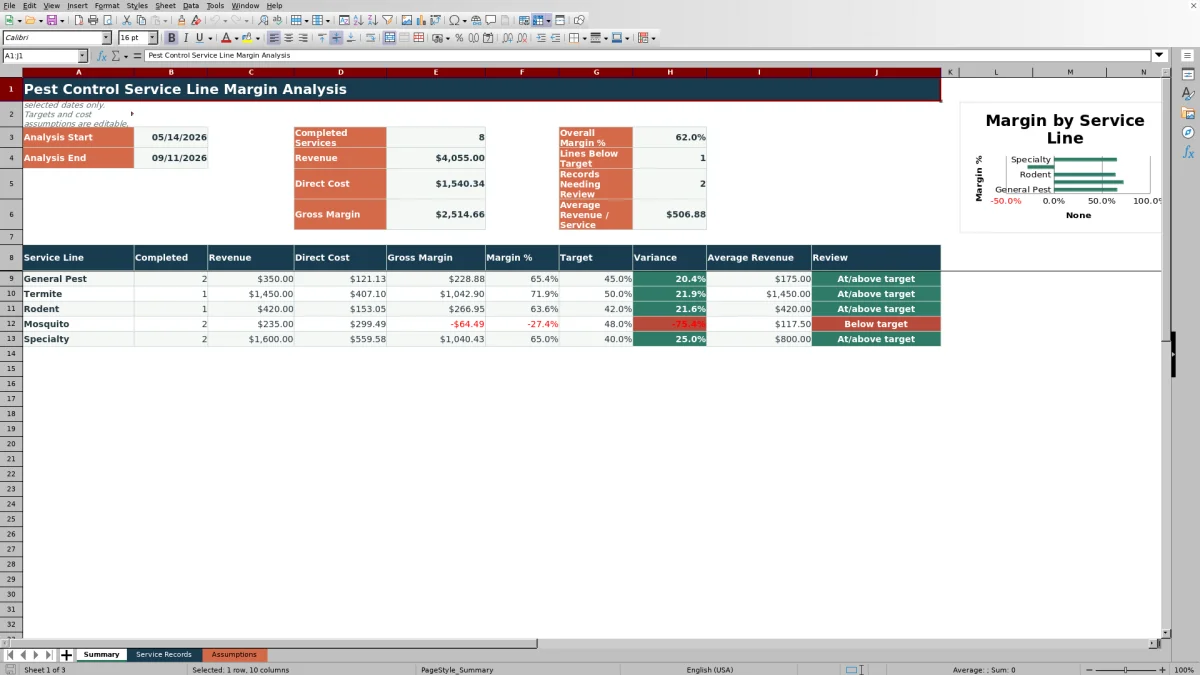
This pest control service line margin analysis Excel workbook compares General Pest, Termite, Rodent, Mosquito, and Specialty work using completed service records within a selected date range.
The spreadsheet calculates labor, product, mileage, and other direct costs, then summarizes revenue, gross margin, margin percentage, target variance, and average revenue by service line. Fictional sample records and editable assumptions make the model ready to test before replacing the examples with business data.
How this workbook can help
- Compare revenue and gross margin across five pest control service lines in one summary.
- Separate labor, product, mileage, and other direct costs to see what affects service profitability.
- Test service-line performance against editable target margins and selected analysis dates.
- Keep record entry consistent with dropdown lists and numeric validation rules.
What is in the file
How to get started
Set the analysis period and assumptions
Open the Assumptions sheet and enter the analysis start date, end date, mileage cost, service-line targets, technician labor rates, and product costs.
Enter or replace service records
Use the prepared input rows on the Service Records sheet. Enter the service date, customer details, service line, technician, product usage, revenue, labor hours, miles, other direct cost, and status.
Check the calculated record values
Confirm that labor, product, mileage, total direct cost, gross margin, and margin percentage populate as expected. If a value is blank, check the related input and its Assumptions entry without overwriting the calculated columns.
Compare service lines
Open the Summary sheet to compare completed volume, revenue, direct cost, gross margin, margin percentage, target variance, and average revenue for the five service lines.
What the Margin Analysis Measures
The Summary sheet uses completed counts and revenue and cost totals to compare General Pest, Termite, Rodent, Mosquito, and Specialty services. The date criteria come from the editable start and end dates on the Assumptions sheet.
Summary results include completed services only. Scheduled and canceled records do not contribute to service-line revenue, cost, or margin totals.
Worked Scenario for a General Pest Visit
Input: A fictional completed General Pest visit has $165.00 of revenue, 1.5 labor hours at $28.50 per hour, two product units at $3.25 each, 14 route miles at $0.70 per mile, and no other direct cost.
Result: Labor cost is $42.75, product cost is $6.50, and mileage cost is $9.80. Total direct cost is $59.05, gross margin is $105.95, and the record-level margin is 64.2%.
Interpretation: Compared with the 45.0% General Pest target, this individual record is 19.2 percentage points above the target. The Summary sheet applies the target to the aggregated General Pest results for the selected period.
Next decision: Check the aggregated General Pest row to determine whether the service line shows the same pattern before changing a price, cost assumption, or target.
How Costs and Targets Flow Through the Workbook
Technician and product selections pull rates from editable assumptions. Labor hours multiply by the technician rate, product quantity multiplies by unit cost, and route miles multiply by the mileage rate. Other direct cost is added to those calculated amounts.
Total direct cost is subtracted from revenue to calculate gross margin. Margin percentage divides gross margin by revenue, while target variance subtracts the service-line target from the aggregated margin percentage.
Common Errors and Solutions
- If a record does not appear in the Summary totals, confirm that its date falls within the analysis period and its status is Completed.
- If a labor rate or product value is blank, use an item included in the applicable Assumptions list or revise the existing assumption entry.
- If product quantity is entered without a product, complete the product input or clear the unrelated quantity.
- If formula-dependent fields stop calculating, check whether a prepared formula was overwritten and restore it from the corresponding formula in a neighboring row.
- If margin percentage is blank, verify that revenue and total direct cost are present and that revenue is not zero.
Scope and Limits
This is a gross margin model based on labor, product, mileage, and other direct costs. It does not calculate overhead allocation or net income.
The prepared Service Records area contains 120 rows, from row 5 through row 124. The summary is fixed to five service lines, and its chart plots actual margin percentages without a separate target series. Results depend on the dates, statuses, revenue entries, operating quantities, and editable assumptions supplied in the workbook.
Excel Workbook Comparison
The complete three-sheet Excel workbook is more suitable when a business needs a bounded, transparent model with editable service-line targets and visible record-level calculations. An accounting-system job-cost report is more suitable when revenue and cost entries are already standardized and maintained in that external system.
| Criterion | Pest control Excel workbook | Accounting-system job-cost report |
|---|---|---|
| Analysis basis | Completed pest control records within editable start and end dates | Posted job transactions included by the report configuration |
| Cost structure | Labor, product, mileage, and other direct cost | Accounts and job-cost categories configured in the accounting system |
| Service-line targets | Five editable target margins shown beside actual results | May require a custom field, custom report, or separate calculation |
| Prepared capacity | 120 service records across five predefined service lines | Capacity depends on the accounting system and report settings |
| Calculation visibility | Record formulas and assumptions are visible in separate sheets | Calculation detail depends on available report fields and system access |
| More suitable when | A focused service-line model and editable assumptions are needed | Job revenue and costs are already maintained in a centralized accounting record |
Interpreting Service-Line Results
A positive target variance indicates that the aggregated service-line margin is at or above its target, while a negative variance indicates that it is below target. Read that variance together with completed volume, total revenue, gross margin, and average revenue rather than relying on one percentage alone.
When a line is below target, use the underlying records to identify whether labor hours, product usage, mileage, other direct cost, or revenue is driving the result. Then update only the source input or assumption that reflects the intended business value.
Frequently asked questions
Which service records are included in the Summary sheet?
The Summary includes records marked Completed when their service dates fall on or between the editable analysis start and end dates.
How does the workbook calculate total direct cost?
Total direct cost is the sum of labor cost, product cost, mileage cost, and other direct cost. Labor, product, and mileage amounts are calculated from operating inputs and editable assumptions.
Can the target margin differ by service line?
Yes. The Assumptions sheet contains a separate editable target for General Pest, Termite, Rodent, Mosquito, and Specialty services.
What happens to Scheduled or Canceled records?
They remain in the Service Records sheet but are excluded from the Summary calculations because those formulas include only Completed records.
How many service records does the prepared workbook support?
The Service Records sheet has 120 prepared rows, covering rows 5 through 124, with formulas and applicable validation already present.
Does this workbook calculate net profit?
No. It calculates gross margin from revenue and the direct cost categories included in the workbook. Overhead and net income are outside its calculation scope.
Editorial responsibility

Maya EllisService workflow editor

Noah BennettWorkbook structure and operations