This pest control annual budget spreadsheet is an Excel workbook for planning revenue, direct costs, overhead, capital spend, operating profit, and operating margin across a selected annual period.
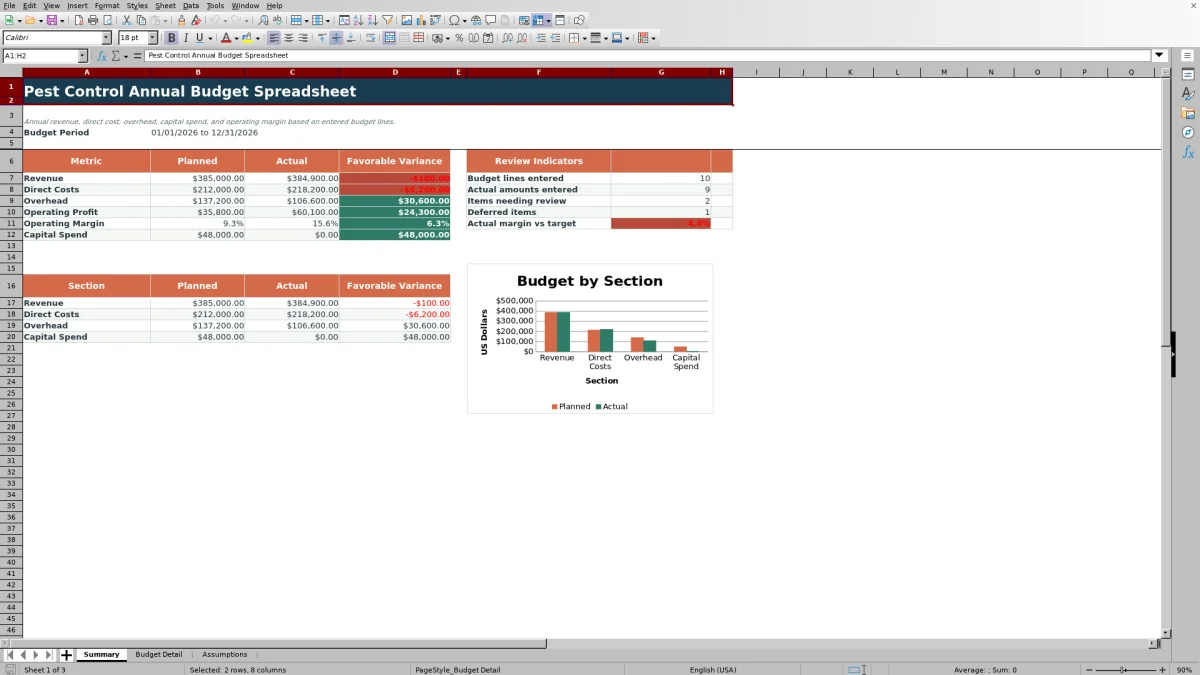
Enter planned and actual amounts on up to 120 dated budget lines, adjust the editable assumptions, and use the summary totals, favorable variances, indicators, and chart to assess performance. All included sample entries are fictional.
How this workbook can help
- Consolidates annual revenue, direct costs, overhead, capital spending, operating profit, and operating margin in one workbook.
- Uses favorable variance logic that treats revenue above plan and costs below plan as positive results.
- Flags incomplete, deferred, unusually large, unplanned, or threshold-level budget entries for further checking.
- Supports consistent entry with validated dates, classifications, responsibilities, statuses, and nonnegative amounts.
What is in the file
How to get started
1. Set the annual assumptions
Open the Assumptions sheet and confirm the budget start date, budget end date, variance threshold, target operating margin, and large-line amount.
2. Replace the fictional budget lines
On Budget Detail, enter each budget date, section, line item, responsibility, status, planned amount, and available actual amount. Use the validated choices where provided.
3. Resolve entry alerts
Check the calculated variance, variance percentage, and alert columns. Correct missing or invalid amounts, confirm classifications, and update deferred or pending entries as appropriate.
4. Assess the annual summary
Use the Summary sheet to compare planned and actual section totals, operating profit, operating margin, capital spend, indicator counts, and the planned-versus-actual chart.
What the Annual Budget Workbook Tracks
The workbook provides an annual operating view of planned and actual revenue, direct costs, overhead, operating profit, operating margin, and capital spend. Summary calculations include dated detail lines that fall between the editable budget start and end dates. Capital spend is reported separately from operating profit.
Worked Pest Control Budget Scenario
This fictional example shows how one revenue entry moves from input to a planning decision.
- Fictional input: Enter recurring service revenue with a planned amount of $265,000 and an actual amount of $270,500.
- Calculated result: Because the section is Revenue, the workbook subtracts planned from actual and returns a favorable variance of $5,500, or about 2.1%.
- Interpretation: Actual revenue is above the entered plan for that line, so the positive variance is favorable.
- Next decision: Keep the confirmed amount in the annual totals and compare the combined revenue, direct-cost, and overhead results with the target operating margin.
Common Entry Errors and Solutions
Fix the source entry when an alert or validation message appears rather than changing a calculated variance cell.
- If a date is rejected, enter a valid date within the start and end dates configured on Assumptions.
- If a section, responsibility, or status is rejected, select one of the available validated choices.
- If an amount is rejected, enter a number of zero or more in the planned or actual field.
- If “Actual pending” appears, add the actual amount when available.
- If a deferred, large, unplanned, or threshold-level line is flagged, confirm the source amount and update the entry or status when needed.
Workbook Limits to Consider
The workbook contains 120 detail lines, with formulas prepared from rows 5 through 124. It does not use Excel tables or defined names. The section chart compares planned and actual totals for revenue, direct costs, overhead, and capital spend rather than showing monthly trends. Summary accuracy depends on valid dates, consistent section choices, and complete numeric entries.
Workbook and blank spreadsheet comparison
Use the prepared workbook when its verified fields and calculations fit the pest-control task. Start with a blank spreadsheet when you need a different model and can build and test every field and formula yourself.
| Method | Setup | Calculations and review | Practical fit |
|---|---|---|---|
| This Excel workbook | Use the prepared structure in the validated file | Review the documented calculations and results | Local editable pest-control workflow supported by the workbook |
| Blank spreadsheet | Create the structure yourself | Build and test every formula and check | A custom model built from scratch |
Using Variances and Review Indicators
Detail rows calculate favorable variance and variance percentage only when the required dates, classifications, and numeric amounts are present. The Summary sheet counts budget lines with planned amounts, lines with actual amounts, alert entries beginning with “Review,” and items marked Deferred. It also compares the actual operating margin with the target entered on Assumptions.
Controlling the Budget Period and Thresholds
The Assumptions sheet sets the budget start and end dates used by the summary formulas. It also stores the variance threshold, target operating margin, large-line amount, and stable choices used by the detail-sheet dropdowns. Changing these values updates the related calculations, date validation boundaries, or alert conditions.
Frequently asked questions
Which budget sections are available in the spreadsheet?
The validated budget-section choices are Revenue, Direct Cost, Overhead, and Capital Spend. These classifications control summary totals and favorable variance logic.
How does the workbook calculate favorable variance?
For revenue, favorable variance equals actual minus planned. For direct costs, overhead, and capital spend, it equals planned minus actual. Positive values therefore indicate a favorable result.
Can I change the annual budget period?
Yes. Edit the budget start and budget end values on the Assumptions sheet. The Summary sheet then includes dated detail lines within that period, and the detail date validation uses the same boundaries.
How many budget entries can the workbook hold?
The Budget Detail sheet provides 120 prepared entry rows, from row 5 through row 124, with variance, percentage, alert, and supporting formulas already filled.
Are the included pest control budget amounts real company data?
No. All sample entries are fictional and are included only to demonstrate the workbook calculations. Replace them with the company’s own internal planning amounts.
Editorial responsibility

Maya EllisService workflow editor

Noah BennettWorkbook structure and operations