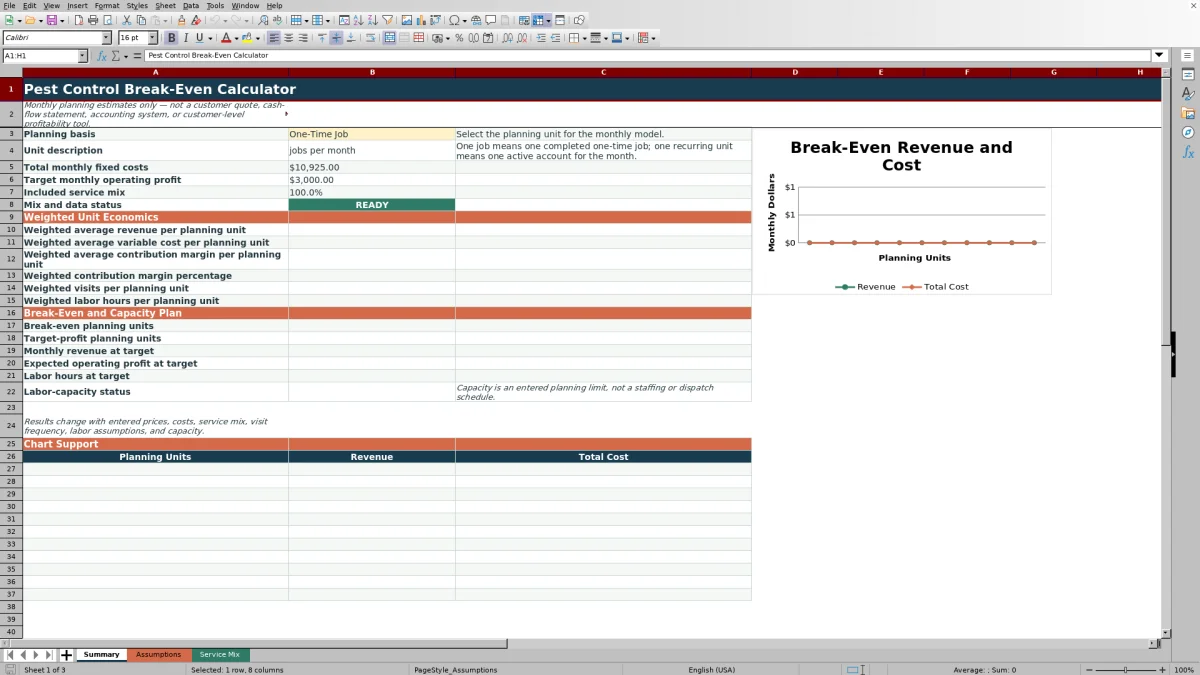
This pest control break-even calculator is an Excel workbook for estimating how many one-time jobs or active recurring accounts are needed each month to cover fixed and variable costs.
Enter monthly overhead, service pricing, visit frequency, direct costs, labor assumptions, service mix, a profit target, and available labor hours to review weighted unit economics, required volume, and capacity status.
How this workbook can help
- Estimate the rounded-up number of monthly jobs or recurring accounts required to break even or reach a target operating profit.
- Combine pricing and variable costs across a weighted mix of included pest control services.
- Test how changes in costs, prices, visit frequency, service mix, and labor assumptions affect required volume.
- Identify whether the labor hours needed at the target volume are within the entered monthly capacity.
What is in the file
How to get started
1. Replace the monthly assumptions
Open the Assumptions sheet and replace the fictional values in the yellow input cells. Enter fixed overhead, the monthly operating-profit target, available field labor hours, and the allowed service-mix variance.
2. Build the service mix
On the Service Mix sheet, replace or exclude the example rows. For each included offering, enter its planning basis, average charge, visit frequency, materials, labor, vehicle costs, revenue-linked costs, other variable costs, and plan-mix percentage.
3. Check the included rows
Confirm that each included row reports READY and that the selected service mix totals approximately 100% within the entered tolerance. Use one visit for a one-time job and the expected monthly visit frequency for a recurring account.
4. Select and review the plan
On the Summary sheet, choose One-Time Job or Recurring Account. Review break-even units, target-profit units, projected revenue, expected operating profit, labor hours, capacity status, and the revenue-versus-total-cost chart.
How the Pest Control Break-Even Model Works
The workbook calculates contribution margin per planning unit by subtracting modeled variable costs from revenue. Variable costs can include materials, direct labor, vehicle and other visit costs, revenue-linked costs, and other costs assigned to each monthly planning unit.
Monthly fixed costs are divided by weighted contribution margin to estimate break-even volume. The target-profit calculation adds the entered operating-profit goal to fixed costs before dividing by contribution margin. Both volume results are rounded up to whole planning units.
Planning Units and Service Mix
The selected planning basis determines whether the Summary uses completed one-time jobs or active recurring accounts. One recurring planning unit represents one active account for the month rather than one service visit.
Only included service rows matching the selected basis enter the weighted calculations. Their plan-mix percentages are normalized by the included total, and the workbook checks whether that total is within the entered tolerance around 100%.
Worked Pest Control Scenario
Fictional scenario: suppose entered fixed costs total $10,925 per month, the target operating profit is $3,000, and the included service mix produces weighted revenue of $200, variable cost of $75, contribution margin of $125, and 1.25 labor hours per planning unit.
The calculated break-even volume is 88 units because $10,925 divided by $125 equals 87.4 and the workbook rounds up. The target-profit volume is 112 units because $13,925 divided by $125 equals 111.4. At 112 units, revenue is $22,400, modeled variable costs are $8,400, and expected operating profit is $3,075.
The result means the rounded target volume slightly exceeds the $3,000 goal. It would require 140 labor hours, so an entered capacity of 600 hours would report within capacity. The next decision could be to test a different service mix, price, cost structure, or profit target before setting the monthly plan.
Common Errors and Solutions
A READY status indicates that an included service row has the required inputs, a valid visit rate, and a positive contribution margin. Use these responses when the Summary does not calculate:
- If the workbook reports NO INCLUDED ROWS, mark at least one completed service row Yes and make sure its planning basis matches the Summary selection.
- If it reports FIX INCLUDED ROWS, review each included row for missing values, an invalid visit rate, or a contribution margin that is not positive.
- If a row reports INCOMPLETE, fill every required input from the service name through plan mix.
- If it reports FIX VISIT RATE, use one visit for a one-time job or a positive monthly visit frequency for a recurring account.
- If the mix is outside tolerance, adjust included plan percentages so they total approximately 100% or revise the allowed variance.
- If it requests a mix tolerance, enter an allowed variance on the Assumptions sheet.
Labor Capacity at the Target Volume
The capacity check multiplies weighted labor hours per planning unit by the rounded target-profit volume. It then compares the result with the available field labor hours entered for the month.
WITHIN ENTERED CAPACITY means the calculated target hours do not exceed that input. ABOVE ENTERED CAPACITY means the target requires more hours than entered. This is a planning limit, not a technician schedule, route plan, or dispatch tool.
Workbook and blank spreadsheet comparison
Use the prepared workbook when its verified fields and calculations fit the pest-control task. Start with a blank spreadsheet when you need a different model and can build and test every field and formula yourself.
| Method | Setup | Calculations and review | Practical fit |
|---|---|---|---|
| This Excel workbook | Use the prepared structure in the validated file | Review the documented calculations and results | Local editable pest-control workflow supported by the workbook |
| Blank spreadsheet | Create the structure yourself | Build and test every formula and check | A custom model built from scratch |
Limits and Responsible Interpretation
Treat every output as a monthly planning estimate. The workbook is not a customer quote, cash-flow statement, accounting system, customer-level profitability tool, staffing schedule, or dispatch plan.
Results change with entered prices, costs, service mix, visit frequency, labor assumptions, and capacity. The fictional example values should be replaced or excluded, and operational factors not separately modeled in the workbook may cause actual results to differ.
Frequently asked questions
What does break-even mean in this pest control calculator?
Break-even is the rounded-up number of selected planning units whose weighted contribution margin covers entered monthly fixed costs. It does not include the optional target operating profit.
What is the difference between a one-time job and a recurring account?
A one-time job is one completed job during the month. A recurring account is one active account for the month, with its expected monthly visit frequency included in variable-cost and labor calculations.
Why is the target-profit result higher than the exact calculation?
The workbook rounds required volume up to a whole planning unit. That rounding can make the expected operating profit at the target volume slightly higher than the entered goal.
Why are the Summary results blank?
Results remain blank when the selected mix is not ready. Check for no included rows, incomplete inputs, invalid visit rates, nonpositive contribution margins, a missing mix tolerance, or included mix percentages outside the allowed variance.
Does a within-capacity result mean the target is operationally scheduled?
No. It only means calculated target labor hours do not exceed the entered monthly field-labor capacity. The workbook does not assign technicians, build routes, or schedule individual jobs.
Editorial responsibility

Maya EllisService workflow editor

Noah BennettWorkbook structure and operations