This pest control recurring revenue forecast is an Excel workbook for estimating scheduled contract revenue by service frequency, next service date, renewal date, status, and expected retention.
Use the 12-month XLSX to maintain up to 100 recurring contracts, identify renewal and retention exposure, and review monthly expected revenue without treating the forecast as an invoice or cash-receipts schedule.
How this workbook can help
- Estimate recurring service revenue across a fixed 12-month forecast period.
- Account for expected retention when scheduled services occur on or after renewal.
- Identify active contracts with overdue renewals, upcoming renewals, or low retention.
- Separate scheduled revenue before retention from expected forecast revenue and retention exposure.
What is in the file
How to get started
1. Set the forecast assumptions
On the Assumptions sheet, update the blue cells for the as-of date, forecast start month, default expected retention, renewal watch window, and low-retention threshold. Confirm that the assumption check displays Ready.
2. Enter recurring contracts
On the Contract Forecast sheet, enter one contract per row. Add a unique contract ID, an authorized or fictional account alias, service frequency, revenue per service, next scheduled service, next renewal date, and status. Enter contract-specific expected retention when needed; otherwise, the default rate applies.
3. Resolve contract alerts
Check the Input Alert column for duplicate IDs, missing required fields, unrecognized frequencies, invalid amounts, retention issues, or date problems. Review the Renewal Alert column for overdue renewals, renewals due soon, and low-retention contracts.
4. Review the revenue outlook
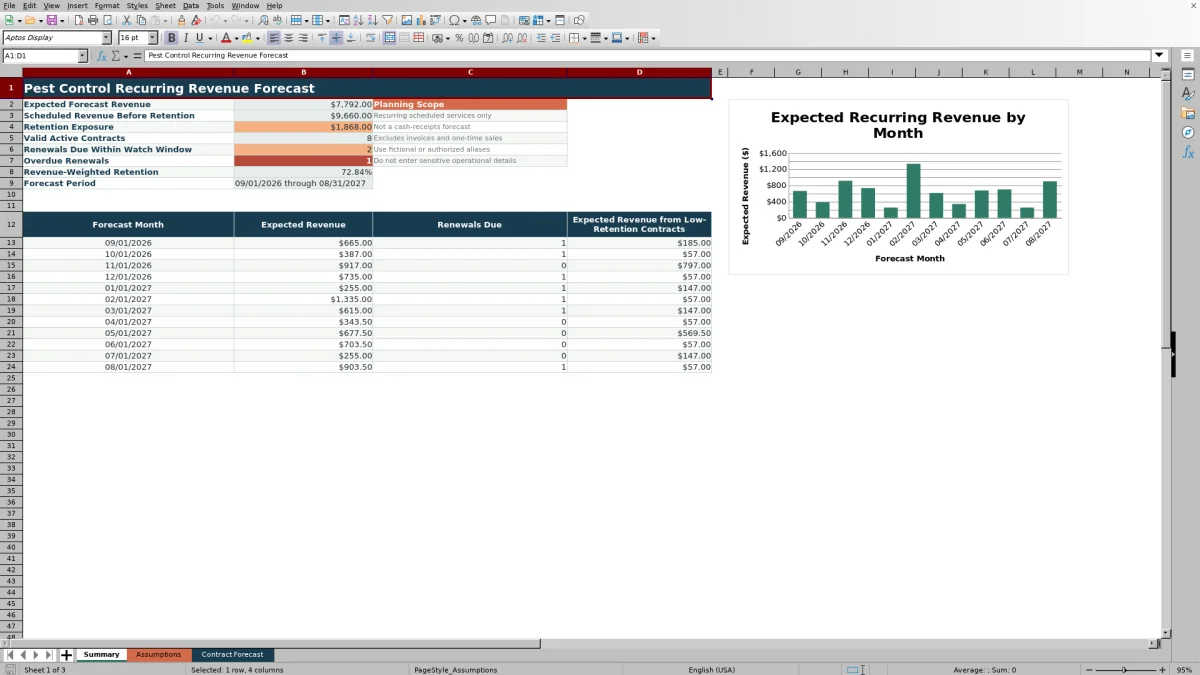
Use the Summary sheet to assess expected forecast revenue, scheduled revenue before retention, retention exposure, valid active contracts, renewal counts, revenue-weighted retention, monthly results, and the expected-revenue chart.
What the recurring revenue forecast covers
The workbook provides a 12-month view of recurring pest control contract revenue. It uses revenue per service, service frequency, the next scheduled service, the next renewal date, expected retention, and contract status to estimate monthly results.
- Scheduled revenue before retention shows the value of recurring services before renewal risk is applied.
- Expected forecast revenue adjusts qualifying services on or after renewal by effective retention.
- Retention exposure shows the difference between scheduled and expected revenue.
- The planning scope excludes invoices, cash receipts, and one-time sales.
How service frequency and renewal timing affect revenue
The frequency list maps Monthly, Every 2 Months, Quarterly, Semiannual, and Annual service plans to intervals of 1, 2, 3, 6, and 12 months. The workbook places revenue in a forecast month when that month aligns with the next scheduled service and its recurring interval.
For an active, valid contract, scheduled services before the renewal date retain the full revenue-per-service value. Services on or after renewal use retention-adjusted revenue. If the contract retention input is blank, the default expected retention assumption is used.
Worked scenario for a fictional monthly contract
Worked scenario: Fictional Account A has monthly service revenue of $120, a next scheduled service of September 15, 2026, a renewal date of December 1, 2026, 90% expected retention, and Active status. The forecast begins in September 2026.
Input leads to result: September, October, and November each remain at $120 because those scheduled services occur before renewal. December through August each forecast $108, calculated as $120 multiplied by 90%. Scheduled revenue before retention is $1,440, expected forecast revenue is $1,332, and retention exposure is $108.
Interpretation leads to the next decision: the contract contributes monthly revenue throughout the period, but the post-renewal amount carries a 10% reduction. Because the renewal date falls within the 90-day watch window from the September 10 as-of date, the next planning decision is to include the contract in the upcoming-renewal workload and assess whether its retention estimate should remain at 90%.
Common errors and solutions
The Input Alert column prevents an affected row from contributing monthly forecast revenue until its issue is cleared.
- Duplicate contract ID: assign a unique ID to each populated contract row.
- Missing required input: complete the account alias, frequency, revenue, scheduled service date, renewal date, and status.
- Frequency not recognized: select one of the five frequencies listed on the Assumptions sheet.
- Amount or retention issue: enter revenue from 0.01 through 100000 and keep optional retention between 0% and 100%.
- Date entry rejected: keep the next scheduled service between the as-of date and the end of the forecast period, and enter a valid renewal date.
- Review assumptions: complete the editable assumptions and confirm that the assumption check displays Ready.
Workbook and blank spreadsheet comparison
Use the prepared workbook when its verified fields and calculations fit the pest-control task. Start with a blank spreadsheet when you need a different model and can build and test every field and formula yourself.
| Method | Setup | Calculations and review | Practical fit |
|---|---|---|---|
| This Excel workbook | Use the prepared structure in the validated file | Review the documented calculations and results | Local editable pest-control workflow supported by the workbook |
| Blank spreadsheet | Create the structure yourself | Build and test every formula and check | A custom model built from scratch |
Forecast limits and planning boundaries
Planning limit: the workbook has a fixed 12-month horizon and 100 contract-entry rows. Forecast timing is evaluated by month, even though scheduled-service and renewal inputs use full dates.
- Only Active contracts contribute forecast revenue.
- Rows with unresolved input alerts do not contribute monthly revenue.
- The workbook forecasts recurring scheduled service revenue, not invoices, collections, cash receipts, or one-time sales.
- Formulas and validation use fixed ranges rather than Excel tables or defined names.
- Account aliases are administrative planning labels and should be fictional or authorized.
Using summary results for the next planning decision
The Summary sheet combines portfolio totals with a monthly table and expected-revenue chart. Review expected revenue alongside renewals due and expected revenue from contracts below the low-retention threshold.
A month with substantial revenue and several renewals due indicates that the forecast depends more heavily on upcoming contract continuation. A month with material low-retention revenue identifies where changing retention assumptions could have a larger effect on the outlook. These results support the next decision to update contract estimates, adjust the renewal watch list, or maintain the current assumptions.
Frequently asked questions
What does this pest control recurring revenue forecast calculate?
It calculates scheduled revenue before retention, expected forecast revenue, and retention exposure for recurring contracts over 12 months. It also summarizes active contract counts, renewal timing, revenue-weighted retention, and monthly low-retention revenue.
Which pest control service frequencies are supported?
The workbook supports Monthly, Every 2 Months, Quarterly, Semiannual, and Annual service frequencies. These choices map to intervals of 1, 2, 3, 6, and 12 months.
How is expected retention applied to contract revenue?
Scheduled services before the next renewal date use the full revenue-per-service amount. Scheduled services on or after renewal are multiplied by effective retention, which comes from the contract row or the default retention assumption when the row is blank.
Do On Hold or Ended contracts contribute forecast revenue?
No. Only contracts marked Active contribute monthly forecast revenue. Contracts marked On Hold or Ended return zero revenue in the monthly forecast.
Is this workbook a cash-receipts or invoice forecast?
No. It forecasts recurring scheduled service revenue for planning purposes. It does not forecast invoices, cash receipts, collections, or one-time sales.
Editorial responsibility

Maya EllisService workflow editor

Noah BennettWorkbook structure and operations