The Pest Control Job Costing Excel Spreadsheet is an XLSX workbook for comparing estimated and actual labor, product, travel, revenue, total cost, and margin for individual jobs.
Use the Job Costing sheet for up to 100 records, maintain rates and lists on Assumptions, and filter the Summary by reporting dates to evaluate completed jobs and flagged records.
How this workbook can help
- Compare estimated and actual costs for each completed pest control job.
- Separate labor, product, and travel costs to identify the source of a variance.
- Measure actual job margin and margin percentage against recorded revenue.
- Summarize completed jobs, flagged records, costs, and margins for a selected date range.
What is in the file
How to get started
1. Set rates, lists, and limits
Open Assumptions and enter technician labor rates, product units and costs, the mileage cost rate, alert limits, permitted dates, and the list values used by the job-entry dropdowns.
2. Enter the job estimate
On Job Costing, add the job ID, service date, customer, site, service details, technician, route, status, product, estimated quantities, labor hours, travel miles, and revenue.
3. Record completed-job actuals
For a completed job, enter actual product quantity, labor hours, travel miles, and revenue. The formulas calculate actual component costs, total cost, margin, margin percentage, and cost variance.
4. Check results for the reporting period
Inspect the Review Alert column for incomplete or threshold-based flags, then set the start and end dates on Summary to view period totals and the labor, product, and travel cost mix.
What the Pest Control Job Costing Spreadsheet Tracks
The workbook uses one row per job to connect operational details with financial results. A record can include the service date, customer, service site, pest concern, service, technician, route, status, responsibility, and product.
Planning inputs cover estimated product quantity, labor hours, travel miles, and revenue. Completed-job inputs capture the corresponding actual values so the workbook can calculate and compare costs and margins.
How Estimated and Actual Job Costs Are Calculated
The workbook calculates estimated and actual costs with rates maintained on Assumptions. Technician selection supplies the hourly labor cost, product selection supplies the unit and unit cost, and the general mileage rate supplies travel cost.
- Labor cost equals labor hours multiplied by the technician's hourly cost.
- Product cost equals product quantity multiplied by its unit cost.
- Travel cost equals travel miles multiplied by the mileage cost rate.
- Total cost is the sum of labor, product, and travel cost.
- Margin is revenue minus total cost, while cost variance is actual total cost minus estimated total cost.
Worked Scenario for a Fictional Completed Job
Input: A fictional perimeter service uses a $32 hourly labor rate, a product cost of $1.25 per ounce, and a mileage cost of $0.70 per mile. The estimate records 2 labor hours, 12 ounces, 18 miles, and $180 of revenue. Actual entries are 2.25 hours, 14 ounces, 20 miles, and $180 of revenue.
Result: Estimated cost is $91.60: $64.00 labor, $15.00 product, and $12.60 travel. Actual cost is $103.50: $72.00 labor, $17.50 product, and $14.00 travel. Cost variance is $11.90, actual margin is $76.50, and actual margin percentage is 42.5%.
The interpretation is that the job cost exceeded its estimate by $11.90, with labor producing the largest part of the difference. The next decision is to compare this row with similar completed jobs and adjust future labor, product, or travel estimates if the same variance pattern recurs.
Using the Summary and Review Alerts
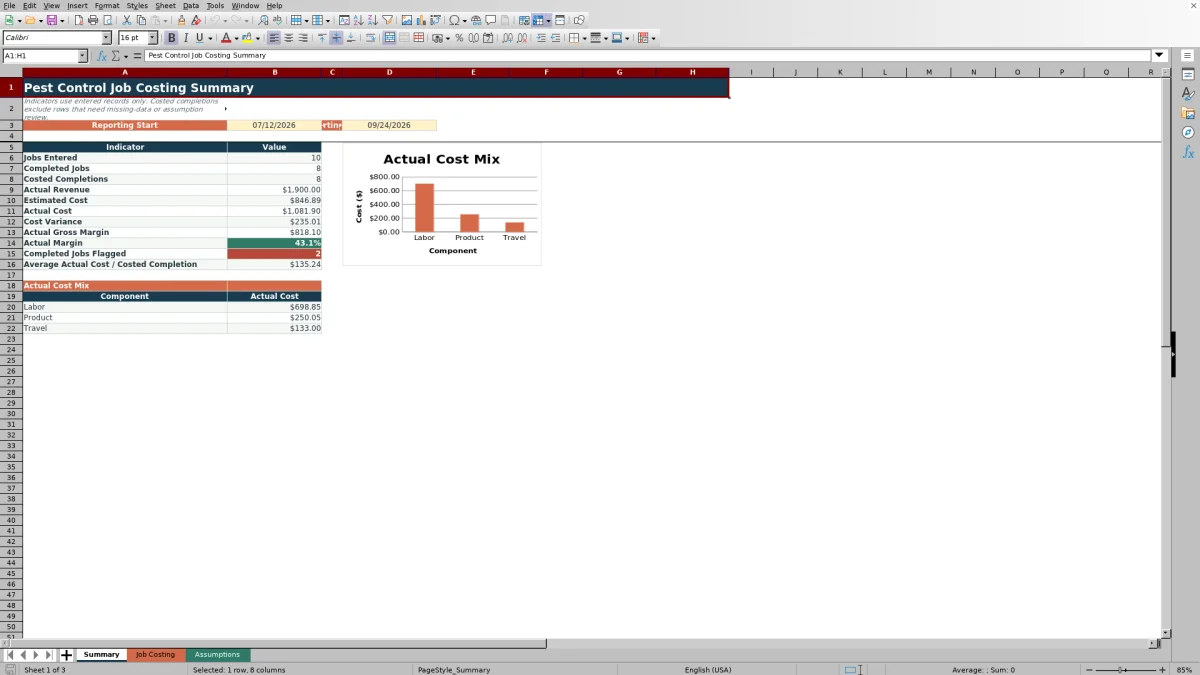
The date-filtered summary reports jobs entered, completed jobs, costed completions, actual revenue, estimated cost, actual cost, cost variance, actual gross margin, actual margin percentage, flagged completed jobs, and average actual cost per costed completion.
Costed completion totals exclude records that still carry missing-data or assumption-related alerts. The cost mix chart uses the qualifying actual labor, product, and travel totals for the selected reporting period.
Common Errors and Solutions
Blank calculated cells usually indicate that a required input or lookup value is missing rather than a zero cost.
- If a labor rate is blank, select a technician listed on Assumptions or add the technician and hourly rate there.
- If product unit or cost is blank, match the selected product to a complete product entry on Assumptions.
- If total cost or margin is blank, complete the required estimated or actual quantity, hours, miles, revenue, and rate inputs.
- If Summary results are missing, check that the job's service date falls between the reporting start and end dates.
- If Review Alert identifies a missing status, missing actuals, or an assumption issue, correct the indicated source fields before using that row in period totals.
Workbook and blank spreadsheet comparison
Use the prepared workbook when its verified fields and calculations fit the pest-control task. Start with a blank spreadsheet when you need a different model and can build and test every field and formula yourself.
| Method | Setup | Calculations and review | Practical fit |
|---|---|---|---|
| This Excel workbook | Use the prepared structure in the validated file | Review the documented calculations and results | Local editable pest-control workflow supported by the workbook |
| Blank spreadsheet | Create the structure yourself | Build and test every formula and check | A custom model built from scratch |
Limits of the Workbook
The workbook provides a 100 job rows fixed entry range from row 5 through row 104. Its formulas, validation, filters, and Summary references are also built around that range, so extending capacity requires updating the related ranges.
- The cost model covers labor, product, and travel rather than every possible business expense.
- Technician rates, product costs, mileage cost, alert limits, and allowed dates require manual maintenance on Assumptions.
- The workbook uses fixed cell ranges rather than Excel tables or defined names.
- The Summary provides period-level indicators and one cost mix chart rather than separate dashboards by technician, route, service, or customer.
Frequently asked questions
What does the pest control job costing spreadsheet calculate?
It calculates estimated and actual labor, product, travel, and total cost for each entered job. It also calculates estimated margin, actual margin, actual margin percentage, and the difference between actual and estimated cost.
How many jobs can the Excel workbook hold?
The Job Costing sheet contains 100 prepared entry rows, covering rows 5 through 104. Formulas, validation, filters, and Summary calculations reference that fixed range.
Can technician rates and product costs be changed?
Yes. The Assumptions sheet contains editable technician hourly rates, product units, product costs, and the mileage cost rate used by job-level formulas.
Which records are included on the Summary sheet?
The reporting start and end dates control the period. Jobs Entered counts dated records with job IDs, Completed Jobs counts records with Completed status, and costed completion measures omit records that still have missing-data or assumption-related alerts.
What can trigger a Review Alert?
The Review Alert formula can identify a missing status, incomplete assumptions, missing actual values for a completed job, a cost variance above the configured limit, or an actual margin condition based on the configured threshold.
Editorial responsibility

Maya EllisService workflow editor

Noah BennettWorkbook structure and operations