This pest control referral commission tracker is an Excel workbook for recording referred customers, service details, referral sources, conversion outcomes, qualification results, earned commissions, and payment status.
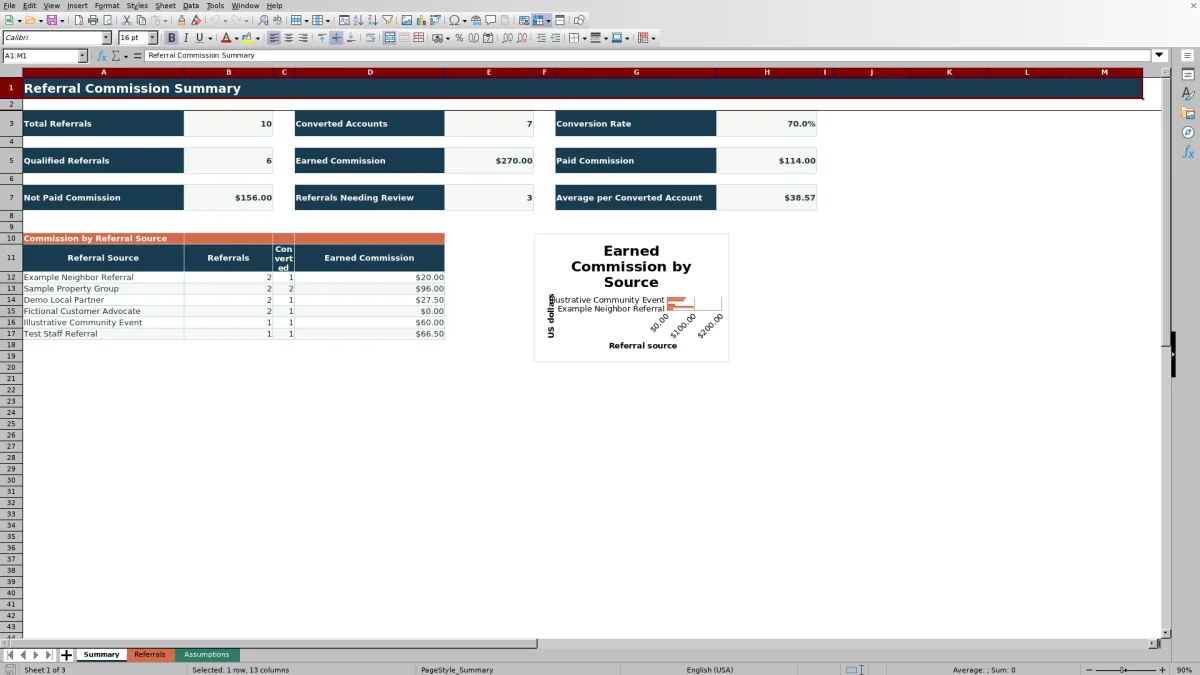
The spreadsheet applies configurable commission rates and minimum qualified sale thresholds by source. Its summary presents referral counts, conversions, qualification activity, commission totals, payment progress, record alerts, and earned commission by referral source.
How this workbook can help
- Calculate referral rewards consistently from configured source rates and minimum qualified sale thresholds.
- Monitor referrals, converted accounts, qualified records, and conversion rate from one summary.
- Separate paid commission from earned commission that has not been counted as paid.
- Identify incomplete or inconsistent referral records through formula-based alerts and entry validation.
What is in the file
How to get started
1. Configure the assumptions
Open the Assumptions sheet and enter up to six referral sources with a commission rate and minimum qualified sale for each. Confirm the available status, pest concern, service, route, and responsibility options.
2. Enter each referral
Use rows 5 through 104 on the Referrals sheet. Add a unique referral ID, customer and service information, source, route, referral date, and current statuses in the editable cells.
3. Update conversion and payment details
When an account converts, enter the converted date, qualification status, and qualified sale amount. Update the payment status and payment date when the commission is paid.
4. Check alerts and summary results
Address messages in the Review Alert column, then use the Summary sheet to monitor referral volume, conversion rate, earned commission, paid commission, outstanding commission, and source-level results.
What the referral commission tracker records
The Referrals sheet provides 100 referral rows, from rows 5 through 104. Each record can include a referral ID, customer, service site, pest concern, service, referral source, route, referral date, conversion status, converted date, qualification status, qualified sale amount, payment status, payment date, and responsibility.
Commission Rate, Minimum Qualified Sale, Commission Earned, and Review Alert are calculated columns. Filters across the full referral range help isolate records by source, status, route, payment state, or another populated field.
How commission calculations work
The workbook looks up the source-specific rate and minimum qualified sale from the Assumptions sheet. Commission is earned only when the conversion status is Converted, the qualification status is Qualified, and the qualified sale amount meets or exceeds the source threshold.
For an eligible record, Commission Earned equals Qualified Sale Amount multiplied by Commission Rate. If the conditions are not met, the calculated commission is zero. The Summary sheet adds earned amounts and separately sums amounts whose payment status is Paid.
Worked referral commission scenario
Assume the fictional referral RF-0002 uses Sample Property Group as its source. That source has an 8% commission rate and a $300 minimum qualified sale. The input is a Converted and Qualified account with a $1,200 qualified sale amount and an Unpaid payment status.
The calculation produces $96 earned commission: $1,200 multiplied by 8%. The result means the referral qualifies for a reward, but the $96 is not included in Paid Commission while its status remains Unpaid. The next decision is to leave it outstanding until payment occurs, then change the status to Paid and enter the payment date.
Common errors and solutions
The Review Alert column and validation rules help identify common record problems.
- If the source is missing, select one of the configured referral sources.
- If the source rate or threshold is blank, complete that source's setup on the Assumptions sheet.
- If a converted account lacks a converted date, enter the date. If a non-converted record has one, confirm or remove the date.
- If Excel rejects a referral ID, check whether that ID already appears in rows 5 through 104.
- If a date or sale amount is rejected, use a date from 2026 through 2035 and keep the amount between zero and the configured maximum qualified sale.
Comparison with a CRM Export and Separate Calculator
This single Excel file combines referral entry, source rules, commission calculations, payment tracking, alerts, summary metrics, and a source chart. A realistic alternative is exporting referral records from a CRM and calculating commissions in a separate spreadsheet or finance tool.
| Area | Excel referral commission workbook | CRM export plus separate calculator |
|---|---|---|
| Workflow | Stores referral details, calculations, payment fields, alerts, and summaries in one workbook. | Moves exported referral data into another tool for commission calculations and reporting. |
| Commission rules | Uses six configurable source rows, each with a percentage rate and minimum qualified sale. | Requires equivalent source rules to be created and maintained in the separate calculator. |
| Entry controls | Includes dropdown lists, unique-ID validation, date limits, amount limits, and formula-based alerts. | Controls depend on the CRM fields, export structure, and calculator configuration. |
| Reporting | Provides nine headline metrics, a source summary, and an earned-commission chart. | Reports must come from the CRM, the calculation tool, or a separate reporting process. |
| Operating range | Prepared for 100 referral records and six referral-source configurations. | Capacity depends on the selected CRM and calculation tool. |
The workbook is more suitable when the team wants a self-contained process for up to 100 referrals with transparent source rules. The CRM export approach is more suitable when referral records already depend on an established CRM-centered process and the separate calculation step is acceptable.
Workbook limits to consider
The fixed operating range covers 100 referral rows and six source configurations. Using additional rows or sources requires corresponding changes to formulas, validation ranges, source summaries, and chart references.
- Date validation accepts dates from January 1, 2026, through December 31, 2035.
- The commission model uses a percentage of qualified sale amount rather than fixed rewards or tiered rates.
- The Summary sheet reports the full referral range and does not provide date-period filtering in its formulas.
- Payment fields record status and date; the workbook does not send payments.
Interpreting the summary for the next decision
Total Referrals and Converted Accounts show activity and completed conversions, while Conversion Rate divides converted accounts by total referrals. Qualified Referrals counts records marked Qualified, regardless of whether every commission condition has been met.
Earned Commission totals calculated rewards. Paid Commission includes earned amounts marked Paid, and Not Paid Commission is earned commission minus paid commission. Referrals Needing Review counts nonblank alerts, indicating which records need data correction or confirmation before the summary is relied on for the next payment-status update.
Frequently asked questions
When does a pest control referral earn commission?
A referral earns commission when it is marked Converted and Qualified and its qualified sale amount meets or exceeds the minimum configured for its referral source. The reward equals the qualified sale amount multiplied by the source commission rate.
Can different referral sources use different commission rates?
Yes. The Assumptions sheet provides six referral-source rows, each with its own commission rate and minimum qualified sale amount.
How many referrals can the Excel tracker hold?
The prepared entry range contains 100 referral rows, from row 5 through row 104. The formulas, validation rules, filters, and summary references are aligned to that range.
How are paid and not-paid commissions calculated?
Paid Commission sums earned amounts whose payment status is Paid. Not Paid Commission equals total earned commission minus paid commission, so it includes earned rewards not currently counted as Paid.
What does Referrals Needing Review mean?
It counts populated messages in the Review Alert column. These messages flag missing source setup, missing dates or statuses, inconsistent converted-date entries, or other record details that need correction or confirmation.
Editorial responsibility

Maya EllisService workflow editor

Noah BennettWorkbook structure and operations