The Pest Control Referral Source Tracker is an Excel workbook for recording individual sales leads and attributing quotes, wins, and revenue to referral sources.
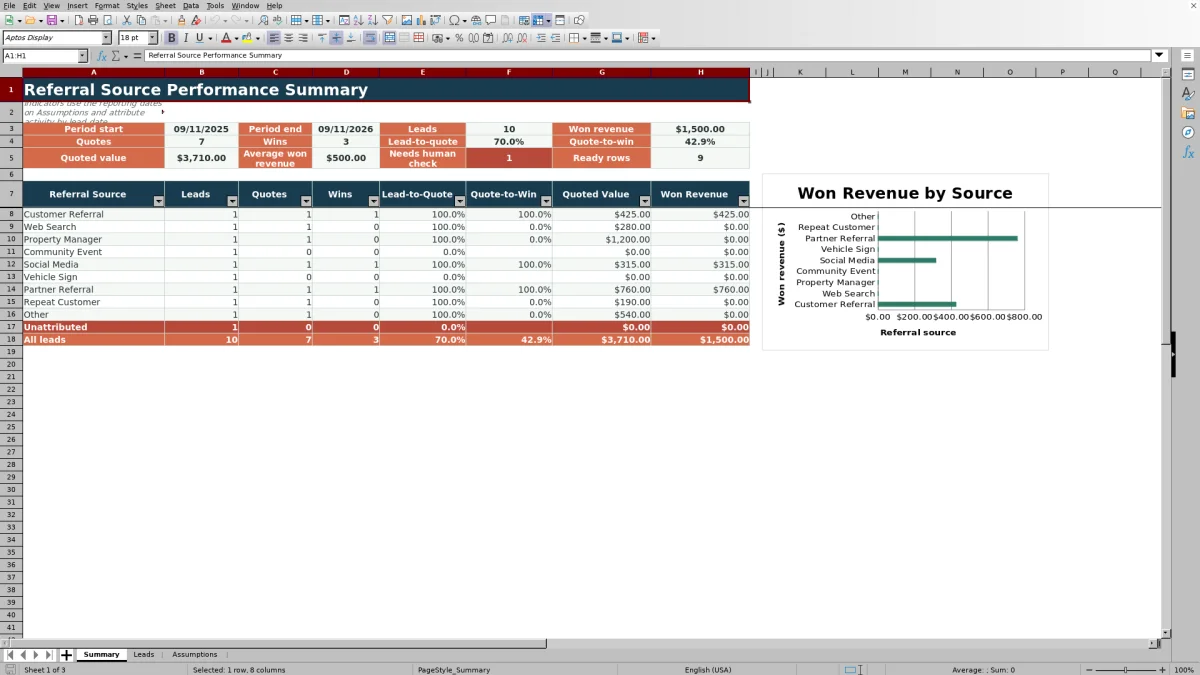
The spreadsheet combines a 100-row lead log, editable operating assumptions, record checks, conversion-rate calculations, referral-source summaries, and a won-revenue chart for a selected reporting period.
How this workbook can help
- See how many leads, quotes, wins, and dollars each configured referral source produces during the selected reporting period.
- Use lead-to-quote and quote-to-win rates to evaluate how opportunities move through the sales process.
- Maintain source names, statuses, pest concerns, services, sales owners, dates, and amount limits in one editable setup area.
- Catch missing fields, duplicate lead IDs, and out-of-order dates through the row-level Record Check.
What is in the file
How to get started
1. Configure the workbook
Open Assumptions and update the referral sources, lead statuses, pest concerns, requested services, sales owners, date limits, reporting dates, and maximum amount as needed.
2. Enter each lead
Use one row per lead on the Leads sheet. Record the lead date, unique ID, customer, service details, referral source, sales owner, and current status.
3. Add quote and decision details
Enter the quote date and quoted amount when a quote is issued. Add the decision date and won revenue when applicable, then resolve any message displayed in Record Check.
4. Review referral performance
Open Summary to compare leads, quotes, wins, conversion rates, quoted value, and won revenue by source for the reporting period set on Assumptions.
How referral-source attribution works
The summary attributes activity according to each record's lead date and referral source. A lead is included when its lead date falls between the reporting start and end dates. Quotes require a populated quote date, while wins require a Lead Status of Won.
Quoted value sums quoted amounts for records with quote dates. Won revenue sums the Won Revenue field for records marked Won. This distinction lets the workbook show both pipeline value and completed sales revenue.
Worked referral-source scenario
Input: During one reporting period, a fictional Customer Referral source produces three leads. One has a $425 quote, Won status, and $425 in won revenue; one has a $300 quote and Quoted status; and one remains New without a quote.
Result: The source summary shows three leads, two quotes, one win, $725 in quoted value, $425 in won revenue, a 66.7% lead-to-quote rate, and a 50% quote-to-win rate.
Interpretation: Two of the three leads reached the quote stage, and one of those quoted opportunities became a win. The rates describe this three-record sample rather than a long-term trend.
Next decision: Keep tracking the source through additional reporting periods and determine whether the open quoted opportunity needs a sales follow-up before changing source-level priorities.
Common errors and solutions
The Record Check column identifies several missing or inconsistent entries:
- If the lead date, lead ID, customer, referral source, sales owner, or status is missing, complete the corresponding field.
- If a lead ID is duplicated, assign a unique ID to each record.
- If a quote or decision date occurs before the lead date, correct the date sequence.
- If a dropdown does not contain the needed operating value, update the applicable list on Assumptions before selecting it on Leads.
- If a date or amount falls outside the accepted range, verify the entry or adjust the applicable limit on Assumptions.
Workbook and blank spreadsheet comparison
Use the prepared workbook when its verified fields and calculations fit the pest-control task. Start with a blank spreadsheet when you need a different model and can build and test every field and formula yourself.
| Method | Setup | Calculations and review | Practical fit |
|---|---|---|---|
| This Excel workbook | Use the prepared structure in the validated file | Review the documented calculations and results | Local editable pest-control workflow supported by the workbook |
| Blank spreadsheet | Create the structure yourself | Build and test every formula and check | A custom model built from scratch |
Meaning of the sales metrics
Lead-to-quote equals quotes divided by leads, and quote-to-win equals wins divided by quotes. Average won revenue equals won revenue divided by wins. These rate and average cells remain blank when the required denominator is unavailable.
A quote is counted from the Quote Date field rather than from the status label. A win is counted from Won status, while its revenue comes from the Won Revenue field. Complete both the status and revenue entry when recording a won opportunity.
Workbook limits to consider
The prepared entry area runs from row 5 through row 104, providing space for 100 lead records. Summary formulas, validation, and record checks reference this range, so additional rows require the relevant ranges and formulas to be extended.
The source summary contains nine configured referral-source rows, followed by Unattributed and All leads. Reporting is based on lead date, not quote date or decision date, and the chart displays won revenue for the nine configured sources.
Using the summary for source decisions
Start with lead volume, then read the two conversion rates alongside quoted value and won revenue. A source with many leads but fewer quotes may warrant a different decision from a source with lower volume and a higher share of wins.
Use the same reporting dates when comparing sources within a period. Before acting on the results, resolve flagged records so missing source labels, duplicate IDs, or incorrect dates do not distort the source totals.
Frequently asked questions
Can I change the referral sources?
Yes. The nine referral-source cells on Assumptions feed the source dropdown and Summary labels. If you replace a label, update existing lead records that used the old label so they match the revised source.
How do I change the reporting period?
Edit the Reporting start date and Reporting end date on Assumptions. The Summary formulas use those dates to include records according to their lead dates.
What makes a lead count as quoted?
A lead counts as quoted when its Quote Date field is populated. Quoted value is the sum of quoted amounts for those records within the selected lead-date period.
How are wins and won revenue calculated?
A win is counted when Lead Status equals Won. Won revenue is summed from the Won Revenue field for records marked Won and included in the selected lead-date period.
How many leads can the prepared workbook hold?
The Leads sheet includes 100 prepared entry rows, from row 5 through row 104. Extending capacity requires updating the formulas, validation ranges, filters, and summary references.
What does the Unattributed row show?
The Unattributed row summarizes records without a referral source, while the All leads row provides totals across the reporting period.
Editorial responsibility

Maya EllisService workflow editor

Noah BennettWorkbook structure and operations