The Pest Control Contract Renewal Tracker is an Excel workbook for recording expiring service agreements, pricing reviews, customer outreach, renewal decisions, and completed renewed terms. It provides 150 record rows on the Renewals sheet, supported by Summary and Assumptions sheets.
Enter contract and commercial details in the editable cells, then use calculated proposed amounts, decision due dates, days to expiration, review bands, next actions, and summary totals to manage the renewal pipeline. Included sample customers, sites, routes, employees, and records are fictional.
How this workbook can help
- Keeps customer, service-site, contract, pricing, outreach, and renewal details in one structured record.
- Surfaces upcoming expirations, missing outreach, expired agreements, and past-due decisions through calculated indicators.
- Connects current annual amounts and price review percentages to proposed renewal amounts.
- Summarizes open agreements, closed decisions, renewed annual amounts, and the renewal decision rate.
What is in the file
How to get started
1. Configure the assumptions
Set the review horizon, decision lead time, urgent threshold, maximum price review change, and maximum annual amount on the Assumptions sheet. Update the reference lists used by the Renewals dropdowns as needed.
2. Enter each agreement
Use an available row on the Renewals sheet to record the customer, service site, pest concern, service, route, assigned personnel, contract dates, current annual amount, and price review percentage. Yellow cells are designated for entry.
3. Record renewal activity
Add the outreach date and update the renewal status as the agreement progresses. When a decision is reached, enter the decision date and, for a renewed agreement, complete the renewed start, expiration, and annual amount fields.
4. Follow the calculated priorities
Filter the Renewals sheet by owner, status, review band, or other tracked fields. Use the Next Action column and Summary indicators to identify records requiring the next operational update.
Maintain a structured contract renewal pipeline
The Renewals sheet places each agreement in one renewal pipeline with fields for the customer, service site, pest concern, service, route, technician, renewal owner, contract dates, annual amounts, outreach, decision, and renewed terms.
Filters across the tracked fields help isolate records by status, owner, route, service, or review band without separating contract details into unrelated files.
Calculate pricing and renewal deadlines consistently
The workbook supports consistent calculations from entered contract data. Proposed Annual Amount equals the Current Annual Amount multiplied by one plus the Price Review percentage. Decision Due equals Contract Expiration minus the configurable decision lead time.
Days to Expiration uses the current date. The calculated Review Band then classifies an open record as Missing Date, Expired - Check, Urgent, Review Window, or Later. Renewed and Lost records are classified as Completed and Closed.
Worked fictional renewal scenario
Input: A fictional bakery agreement has a current annual amount of $2,400, a 4% price review, a September 21, 2026 expiration date, a Not Started status, and no outreach date.
Result: The proposed annual amount calculates to $2,496. With the default 14-day lead time, the decision due date calculates to September 7, 2026. The review band changes with the current date: Review Window within 90 days, Urgent within 30 days, and Expired - Check after expiration if the agreement remains open.
Interpretation: When the agreement enters the review horizon without an outreach date, the Next Action calculation identifies customer outreach as the pending activity.
Next decision: The renewal owner can record outreach, update the status after the customer responds, and complete either the renewed terms or the closed outcome.
Common errors and solutions
Correct the source entry when a calculated result is blank or an alert appears unexpectedly.
- If Proposed Annual Amount is blank, confirm that Customer, Current Annual Amount, and Price Review percentage are all entered.
- If Review Band shows Missing Date, enter the Contract Expiration date.
- If Next Action shows Complete renewed terms, verify that Renewed Start, Renewed Expiration, and Renewed Annual Amount are complete.
- If the Summary reports a past-due decision, check whether Decision Due is before the current date while Decision Date is blank and the status remains open.
Workbook and blank spreadsheet comparison
Use the prepared workbook when its verified fields and calculations fit the pest-control task. Start with a blank spreadsheet when you need a different model and can build and test every field and formula yourself.
| Method | Setup | Calculations and review | Practical fit |
|---|---|---|---|
| This Excel workbook | Use the prepared structure in the validated file | Review the documented calculations and results | Local editable pest-control workflow supported by the workbook |
| Blank spreadsheet | Create the structure yourself | Build and test every formula and check | A custom model built from scratch |
Understand the workbook limits
The renewal formulas, summary ranges, and validation controls cover rows 5 through 154, providing capacity for 150 records. Records added outside that range will not be included unless the relevant formulas, validations, filters, and summary references are extended.
Review horizons, urgency thresholds, and decision lead time are shared assumptions rather than record-specific settings. Because timing formulas use the current date, review bands and summary counts can change as the calendar advances.
Read the summary indicators
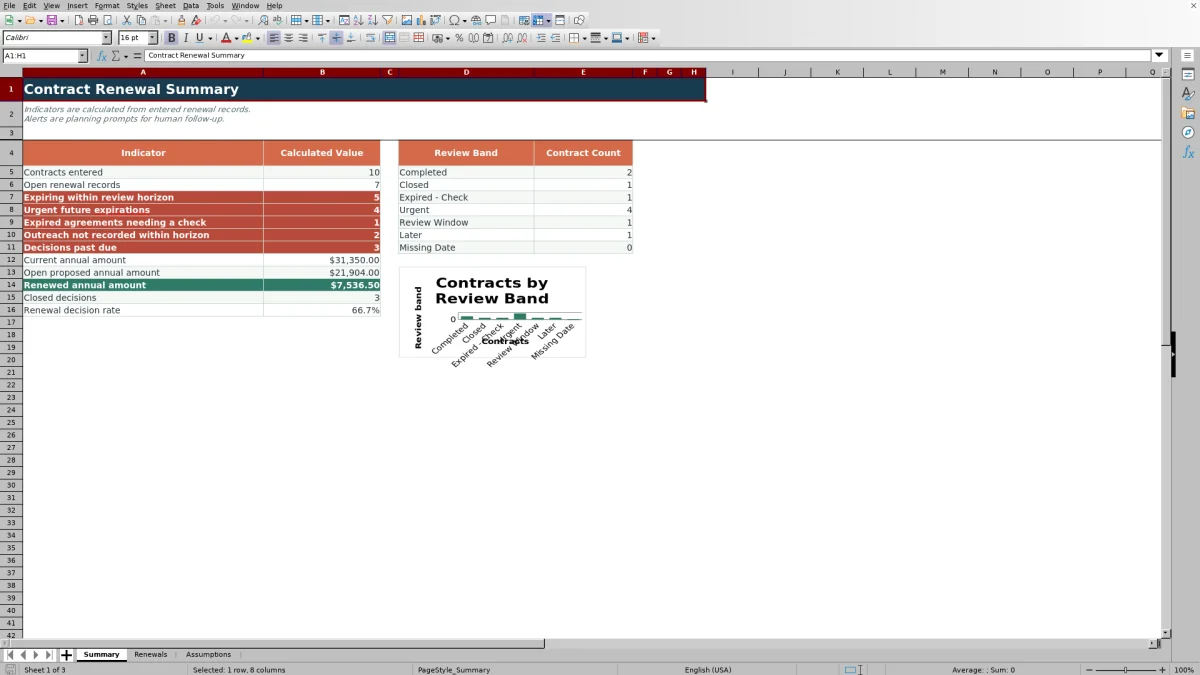
The Summary sheet reports contracts entered, open renewal records, agreements within the review horizon, urgent future expirations, expired agreements needing a check, missing outreach, and past-due decisions.
Financial indicators total current annual amounts, open proposed annual amounts, and renewed annual amounts. Closed decisions and the renewal decision rate use records marked Renewed or Lost, while the chart displays contract counts across the seven review bands.
Frequently asked questions
What information does the Pest Control Contract Renewal Tracker store?
Each renewal row can store the customer, service site, pest concern, service, route, technician, renewal owner, contract dates, current annual amount, price review percentage, outreach date, renewal status, decision details, and completed renewed terms.
How is the proposed annual amount calculated?
The workbook multiplies Current Annual Amount by one plus the entered Price Review percentage. The result remains blank when the customer, current amount, or percentage is missing.
How are review bands assigned?
An open agreement with no expiration date is marked Missing Date. An expired agreement is marked Expired - Check. Future expirations are marked Urgent, Review Window, or Later according to the configurable 30-day and 90-day default thresholds. Renewed and Lost records are marked Completed and Closed.
What causes a decision to appear past due?
The Summary counts a decision as past due when its calculated Decision Due date is earlier than the current date, the Decision Date is blank, and the renewal status is neither Renewed nor Lost.
Can the tracker lists and timing thresholds be changed?
Yes. The Assumptions sheet contains editable values for the review horizon, decision lead time, urgent threshold, price review limit, annual amount limit, and reference lists used by the Renewals dropdowns.
Editorial responsibility

Maya EllisService workflow editor

Noah BennettWorkbook structure and operations