This pest control technician commission calculator is a three-sheet Excel workbook for calculating incentives from eligible service production, technician rates, monthly thresholds, bonuses, and direct adjustments.
Configure technician compensation on the Assumptions sheet, enter service records chronologically on the Production sheet, and use the Summary sheet to inspect company totals and the displayed technician breakdown.
How this workbook can help
- Converts completed service amounts into eligible production using responsibility shares.
- Applies technician-specific base rates, monthly thresholds, and bonus rates.
- Separates base commission, bonus commission, and direct adjustments for clearer tracking.
- Summarizes entered service amounts, eligible production, commissions, dates, and rows requiring attention.
What is in the file
How to get started
1. Configure technician assumptions
On the Assumptions sheet, replace the fictional technician entries and enter each technician’s base commission rate, monthly threshold, and bonus rate. Confirm the eligible shares assigned to Primary, Assist, and Office / Other responsibilities.
2. Confirm the worksheet limits
On the Production sheet, check the permitted service-date range, maximum service amount, and commission adjustment limit before entering records.
3. Enter production chronologically
Complete the service date, customer, site, pest concern, service, technician, route, status, responsibility, and service amount. Keep entries in chronological order because monthly threshold bonuses are assigned in row order. Enter a commission adjustment only when one applies.
4. Inspect checks and totals
Correct messages in the Production sheet’s Input Check column and the Assumptions sheet’s Setup Check column. Then use the Summary sheet to inspect eligible production, base commission, bonus commission, applied adjustments, and total commission.
How the commission calculation works
A completed service produces eligible production by multiplying its service amount by the eligible share for the selected responsibility. The workbook then multiplies that eligible production by the technician’s base commission rate.
For each technician and calendar month, cumulative eligible production is compared with the configured threshold. The incremental monthly bonus applies only to production newly assigned above that threshold. Total commission is base commission plus bonus commission plus any numeric direct adjustment.
Worked fictional commission scenario
Input: Avery Example completes a fictional Primary service for $1,200. Avery has no earlier eligible production in that month, a 10% base rate, a $1,000 monthly threshold, a 3% bonus rate, and no adjustment.
Result: The Primary share makes all $1,200 eligible. Base commission is $120, while $200 is above the monthly threshold and generates a $6 bonus. The record produces a $126.00 total commission.
Interpretation: Avery has crossed the monthly threshold, so later eligible production entered for Avery in the same month can receive the incremental bonus rate. The next decision is whether a direct commission adjustment applies to this record; if not, the adjustment cell remains blank.
How status and responsibility affect production
Only a service marked Completed generates eligible production. Pending and Cancelled records calculate zero eligible production, although a numeric direct adjustment can still affect total commission when entered.
The supplied responsibility setup assigns 100% to Primary, 50% to Assist, and 0% to Office / Other. For example, a completed $400 service assigned as Assist produces $200 of eligible production before the technician’s rates and threshold are applied.
Errors and solutions
The Production sheet’s Input Check column identifies rows that need correction. If Check missing required input appears, complete the required fields from service date through service amount. If a date check appears, enter a valid Excel date within the limits shown at the top of the sheet.
The Assumptions sheet’s Setup Check identifies missing technician names, incomplete or invalid rates, negative thresholds, rates outside the permitted range, and duplicate technician entries. If calculated rate fields remain blank, confirm that the production entry’s technician matches a configured technician and that the responsibility matches a configured category.
Workbook limits and operating boundaries
The supplied Production sheet contains 120 service-entry rows, covering rows 7 through 126. Its configured limits are service dates from September 11, 2024, through September 11, 2027, a maximum service amount of $25,000, and commission adjustments from negative $75 through positive $75.
The Assumptions sheet provides 100 technician setup rows. The Summary sheet counts every populated technician setup but displays detailed totals for 12 technician rows. Formulas and validations are built for the stated ranges, so entries outside those ranges are not included automatically.
Workbook and blank spreadsheet comparison
Use the prepared workbook when its verified fields and calculations fit the pest-control task. Start with a blank spreadsheet when you need a different model and can build and test every field and formula yourself.
| Method | Setup | Calculations and review | Practical fit |
|---|---|---|---|
| This Excel workbook | Use the prepared structure in the validated file | Review the documented calculations and results | Local editable pest-control workflow supported by the workbook |
| Blank spreadsheet | Create the structure yourself | Build and test every formula and check | A custom model built from scratch |
Reading the commission summary
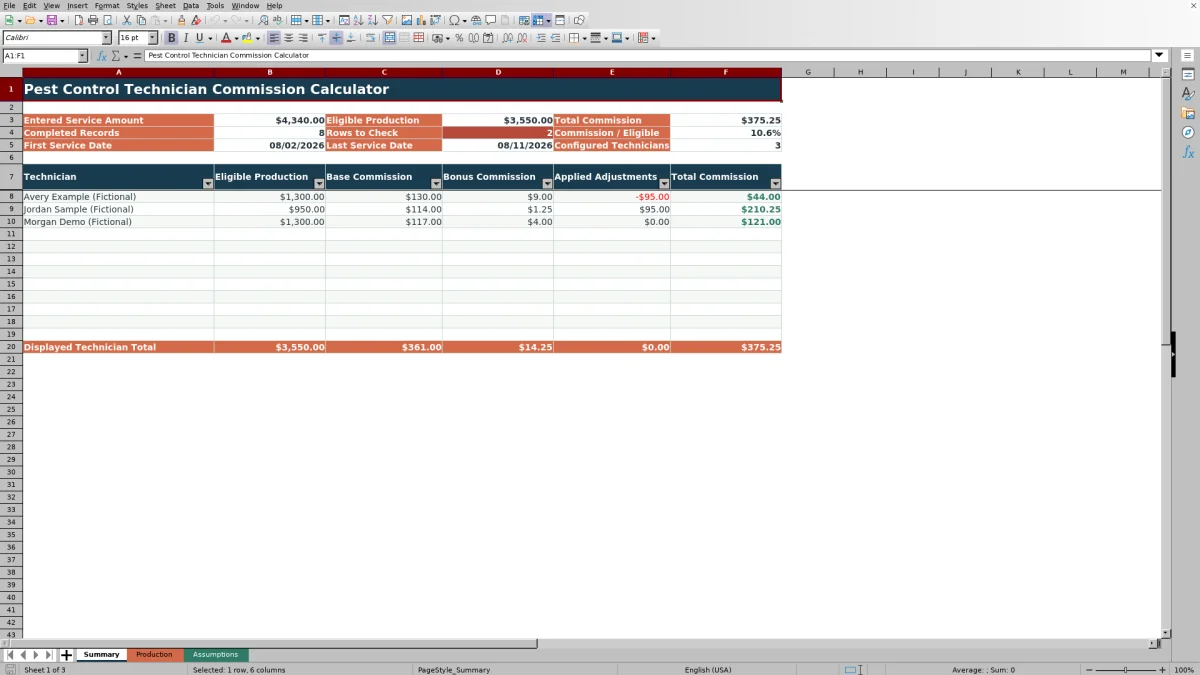
The Summary sheet separates entered service amount from eligible production, which helps show how statuses and responsibility shares affect the commission base. It also reports total commission, completed records, rows to check, first and last service dates, and the commission-to-eligible-production percentage.
For each displayed technician, the summary presents eligible production, base commission, bonus commission, applied adjustments, and total commission. These amounts show whether a result came from standard production, production above the monthly threshold, or a direct adjustment.
Frequently asked questions
Which pest control service records generate eligible production?
Only records marked Completed generate eligible production. The completed service amount is multiplied by the eligible share for the selected responsibility category.
How does the monthly commission threshold work?
The workbook accumulates eligible production for each technician within the service-date month. Only the incremental production above that technician’s configured monthly threshold receives the bonus rate.
Why must production entries be chronological?
Bonus-eligible production is assigned in row order as a technician crosses the monthly threshold. Chronological entry keeps that assignment aligned with the sequence of service dates.
How do commission adjustments affect the result?
A numeric adjustment is added directly to base commission and bonus commission. The supplied Production sheet accepts adjustments from negative $75 through positive $75.
How many technicians and service entries does the Excel workbook support?
The workbook includes 120 service-entry rows and 100 technician setup rows. The Summary sheet displays detailed commission totals for 12 technician rows while separately counting all populated technician setups.
Editorial responsibility

Maya EllisService workflow editor

Noah BennettWorkbook structure and operations