This pest control chemical cost calculator is an Excel workbook for calculating product cost per treatment from application quantity, dilution, pack size, and unit price. It converts treatment entries into concentrate used, cost per ounce, and chemical cost.
The XLSX includes separate sheets for product assumptions, treatment cost entries, and summary reporting. It supports planned, completed, review, and canceled statuses while keeping product pricing and dilution assumptions editable.
How this workbook can help
- Calculate chemical cost consistently from four connected cost inputs.
- Maintain reusable dilution, pack size, and unit price assumptions for each product.
- Separate completed, planned, and canceled records in summary reporting.
- Identify missing dates, products, application quantities, or product setup values.
What is in the file
How to get started
1. Set up the product catalog
Open Assumptions and enter each product name, default dilution in ounces per gallon, pack size in ounces, unit price, and product status. The workbook calculates cost per ounce.
2. Update the operating lists
Edit the route, technician, cost responsibility, and status lists on Assumptions so the available selections match the records you want to enter.
3. Record treatment details
On Treatment Costs, enter the date and service details, select a product, and enter the application quantity in gallons. The workbook looks up the product assumptions and calculates concentrate used and chemical cost.
4. Check results and summaries
Resolve any message in the final check column, confirm the record status, and use Summary to view completed cost, planned cost, averages, totals, exceptions, and the product cost chart.
How the Chemical Cost Calculation Works
The workbook links each treatment entry to its selected product on Assumptions. Concentrate used equals application gallons multiplied by dilution in ounces per gallon. Cost per ounce equals unit price divided by pack size in ounces. Chemical cost equals concentrate used multiplied by cost per ounce.
The combined calculation is application quantity × dilution × unit price ÷ pack size. Because the product values are stored separately, changing a product assumption updates linked treatment calculations.
Worked Pest Control Cost Scenario
Input: A fictional perimeter service uses 12 gallons of application volume with Fictional Mix Alpha. Its dilution is 0.50 ounce per gallon, its pack contains 64 ounces, and its unit price is $128.00.
Result: The entry uses 6 ounces of concentrate. The product costs $2.00 per ounce, producing a chemical cost of $12.00.
Interpretation: The calculated chemical cost is $1.00 per gallon of entered application volume for this fictional record. Next decision: Confirm the cost responsibility and record status so the $12.00 appears in the appropriate summary total.
Treatment Status and Cost Reporting
Treatment Costs includes fields for date, route, customer, service site, pest concern, service, technician, product, application quantity, cost responsibility, and status. Calculated columns return dilution, concentrate used, pack size, unit price, cost per ounce, and chemical cost.
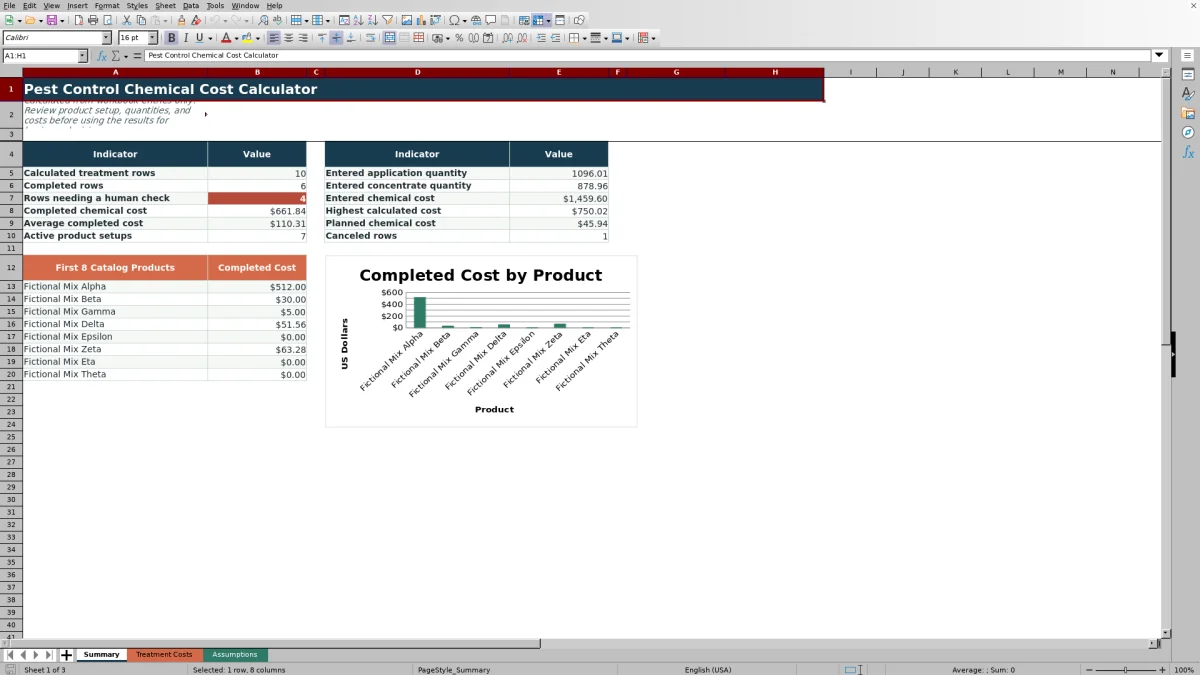
Summary reports completed chemical cost separately from planned chemical cost. Canceled rows are counted but excluded from completed totals. The sheet also reports the average completed cost, highest calculated cost, entered quantities, active product setups, and rows with check messages.
Common Entry Errors and Solutions
- Missing date: enter a valid date in the treatment row.
- Missing product: select a product that appears in the Assumptions product list.
- Missing application quantity: enter the applicable quantity in gallons.
- Blank lookup results: complete the selected product's dilution, pack size, and unit price on Assumptions.
- Unexpected summary category: confirm whether the row is marked Planned, Completed, Review, or Canceled.
- Unexpected cost: confirm that dilution is entered in ounces per gallon and pack size is entered in ounces.
Comparison with a Calculator and Separate Notes
This Excel workbook and a calculator with separate notes can both support cost arithmetic, but they fit different operating needs.
| Decision factor | Excel workbook | Calculator and separate notes |
|---|---|---|
| Product assumptions | Stores dilution, pack size, unit price, cost per ounce, and product status in a reusable catalog. | Requires values to be found and entered again for each calculation. |
| Treatment records | Connects up to 100 treatment rows with dates, operating details, statuses, and calculated costs. | Depends on a separate paper or digital record for treatment details. |
| Calculation flow | Uses linked formulas to calculate concentrate used and chemical cost after a product and quantity are entered. | Requires each calculation to be performed and transferred manually. |
| Summary reporting | Totals completed and planned costs and provides counts, averages, a maximum, and one product chart. | Requires separate aggregation to create comparable totals or charts. |
| When it is more suitable | More suitable when recurring treatments need consistent product assumptions, status-based totals, and retained operating details. | More suitable when only a one-time estimate is needed and no ongoing treatment log or summary is required. |
Workbook Limits
The workbook calculates chemical product cost from entered assumptions and quantities. It does not calculate labor, travel, equipment, overhead, profit margin, inventory balances, or the number of packs to purchase.
Calculation space is limited to 100 product setup rows and 100 treatment rows. The Summary product chart covers the first eight products in the assumptions catalog, while the displayed totals use the treatment ranges through row 104.
Using the Summary for Cost Decisions
Use completed chemical cost and average completed cost to understand recorded product spending for finished work. Planned chemical cost provides a separate view of entries that have not been marked completed.
The highest calculated cost can help locate an unusually large entry, while entered application quantity and concentrate quantity provide volume context. Product-level completed costs for the first eight catalog products appear beside the Summary chart.
Frequently asked questions
What inputs are required to calculate chemical cost?
The core inputs are application quantity in gallons, dilution in ounces per gallon, pack size in ounces, and unit price. The selected product supplies the last three values from Assumptions.
How does the Excel workbook calculate cost per treatment?
It multiplies application gallons by dilution to calculate concentrate used, divides unit price by pack size to calculate cost per ounce, and multiplies those two results to calculate chemical cost.
How many products and treatment entries can the workbook hold?
Assumptions provides 100 product setup rows, and Treatment Costs provides 100 treatment-entry rows, covering rows 5 through 104 on each sheet.
How do treatment statuses affect the Summary sheet?
Completed rows contribute to completed cost and average completed cost. Planned rows contribute to planned chemical cost, while canceled rows are counted separately and excluded from completed totals.
Can product prices and pack sizes be updated?
Yes. Product dilution, pack size, unit price, and status are editable on Assumptions. Cost per ounce and linked treatment costs are formula-driven from those entries.
Editorial responsibility

Maya EllisService workflow editor

Noah BennettWorkbook structure and operations