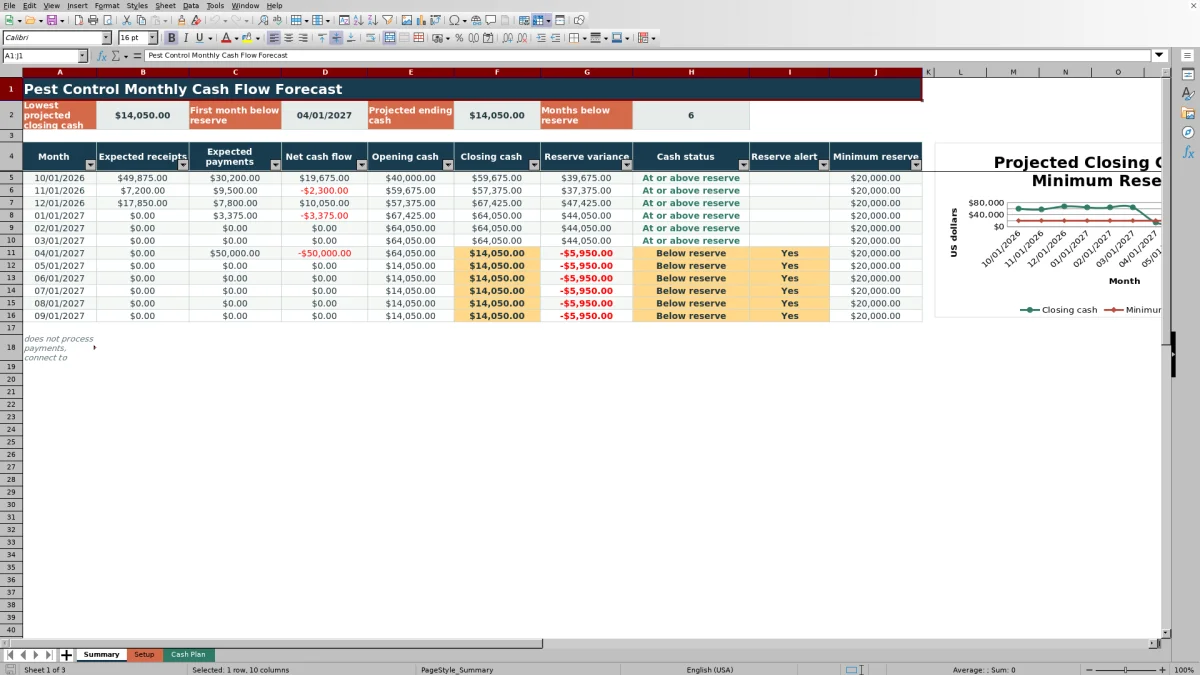
This Excel workbook provides a pest control monthly cash flow forecast for expected service receipts, operating payments, and rolling cash balances. It turns detailed cash-plan entries into a 12-month summary of net cash flow, closing cash, and reserve position.
Use the XLSX spreadsheet to enter positive amounts for residential, commercial, and one-time service receipts or expenses such as payroll, vehicle and fuel, materials and equipment, rent, insurance, and marketing. Dates, cash direction, category, probability, and status drive the probability-weighted forecast.
How this workbook can help
- See expected receipts, payments, and closing cash by month.
- Identify projected negative cash and months below the minimum reserve.
- Account for uncertain collections with default or line-level probabilities.
- Trace monthly totals back to individual cash-plan entries.
What is in the file
How to get started
1. Set the forecast assumptions
On Setup, enter the as-of date, forecast start month, opening cash, minimum cash reserve, and default probabilities for planned receipts and payments.
2. Replace the fictional cash-plan entries
On Cash Plan, enter each expected date, cash direction, category, description, positive amount, probability when needed, status, and notes. Use a unique item ID for each record.
3. Resolve review flags
Check the calculated effective probability, forecast amount, forecast month, and review flag. Correct category-direction mismatches, outdated dates, duplicate IDs, or missing required inputs.
4. Review the monthly outlook
Use Summary to compare expected receipts with payments, follow the rolling closing balance, and identify any projected month with negative cash or cash below the selected reserve.
Monthly cash planning for pest control operations
Pest control businesses can use the workbook to organize expected service collections alongside payroll, fuel, materials, rent, insurance, marketing, and other listed payments. The connected Cash Plan, Setup, and Summary sheets turn those entries into a view of monthly liquidity without requiring users to calculate each monthly total manually.
The summary rolls one month's closing cash into the next month's opening cash. It also compares every projected closing balance with the minimum reserve entered on Setup.
How probability and status affect the forecast
Each planned entry receives an effective probability. A line-level probability is used when provided; otherwise, the workbook applies the default planned receipt or payment probability from Setup. Committed entries use 100%, while completed and canceled entries contribute zero to the forward-looking forecast.
The forecast amount equals the positive item amount multiplied by its effective probability. Cash direction then determines whether that result is included with monthly receipts or monthly payments.
Worked scenario: October service collections and payments
This fictional scenario shows how an input becomes a monthly decision signal.
Input: Opening cash is $40,000 and the minimum reserve is $20,000. October includes $38,000 of planned residential receipts using the 85% default probability, $18,500 of planned commercial receipts at 95%, and $45,000 of committed payments.
Result: Forecast receipts are $32,300 plus $17,575, or $49,875. Forecast payments are $45,000, producing net cash flow of $4,875 and projected closing cash of $44,875.
Interpretation: Closing cash is $24,875 above the reserve, so the month is classified at or above reserve.
Next decision: No reserve shortfall appears in this fictional month. The next step is to verify collection dates and statuses, then inspect later months for a possible decline in closing cash.
Common errors and solutions
The Review flag helps identify entries that need correction or timing attention.
- For a category-direction mismatch, choose a category mapped to the selected receipt or payment direction, or correct the direction.
- For a past expected date, update the date if timing changed or update the status if the item is no longer part of the forward forecast.
- If an item falls outside the forecast period, confirm whether its expected date belongs in the included 12-month outlook.
- If an item ID is rejected, enter a unique ID or leave the field blank until the record is ready.
- If the forecast amount is blank, complete the expected date, direction, positive amount, and status, then check that an effective probability appears.
Workbook and blank spreadsheet comparison
Use the prepared workbook when its verified fields and calculations fit the pest-control task. Start with a blank spreadsheet when you need a different model and can build and test every field and formula yourself.
| Method | Setup | Calculations and review | Practical fit |
|---|---|---|---|
| This Excel workbook | Use the prepared structure in the validated file | Review the documented calculations and results | Local editable pest-control workflow supported by the workbook |
| Blank spreadsheet | Create the structure yourself | Build and test every formula and check | A custom model built from scratch |
Workbook limits and responsible interpretation
This is a forecast, not actual cash. Results depend on the dates, amounts, probabilities, directions, and statuses entered. A customer payment can arrive later than expected, and an operating payment can change after the workbook is updated.
The included structure summarizes 12 months and provides 200 cash-plan rows. It does not process payments, connect to accounting systems, or provide financial or tax advice. Completed and canceled items receive a zero forecast amount, so statuses should be maintained carefully.
A repeatable monthly update routine
At each update, revise the as-of date, confirm opening cash, and review expected dates for service collections and operating payments. Change a probability only when the likelihood has changed, and change a status when an item becomes committed, completed, or canceled.
After resolving flags, review the lowest projected closing cash, first month below reserve, projected ending cash, and number of months below reserve. Those outputs help determine which collection assumptions or payment dates need closer planning attention.
Frequently asked questions
How does the workbook estimate uncertain pest control receipts?
A planned receipt uses its line-level probability when one is entered. Otherwise, it uses the default planned receipt probability from Setup. The amount is multiplied by the effective probability before it reaches the monthly summary.
How do statuses change forecast amounts?
Committed items use a 100% effective probability. Completed and canceled items use 0%, while planned items use a line-level probability or the applicable default from Setup.
Can I change the forecast start month, opening cash, and reserve?
Yes. Those assumptions are entered on Setup. The forecast start must be the first day of a month, and the opening cash and minimum reserve accept nonnegative values.
Why is a cash-plan item missing from the monthly totals?
Check that the entry has an expected date, cash direction, positive amount, status, and effective probability. Also confirm that its forecast month falls within the included 12-month period. Completed and canceled items contribute zero.
Does the Excel workbook connect to accounting or payment systems?
No. It is a standalone cash forecasting workbook. It does not import accounting activity, process payments, or replace financial or tax advice.
Editorial responsibility

Maya EllisService workflow editor

Noah BennettWorkbook structure and operations