The Pest Control Pricing Calculator is an Excel workbook for building planning estimates for individual service visits from entered job details and visible assumptions. It keeps labor, product, mileage, other direct cost, overhead, markup, and optional tax inputs in one pricing workflow.
Enter one service job per row to calculate direct cost, cost basis, price before tax, customer price, gross profit, margin, and a review alert. A separate Summary sheet rolls up totals, averages, alerts, and customer-price totals by listed service.
How this workbook can help
- Creates a consistent cost build-up from labor, products, mileage, other direct costs, and overhead.
- Applies shared overhead, markup, and optional tax assumptions across service-pricing rows.
- Shows customer price, pre-tax gross profit, and margin alongside the underlying costs.
- Summarizes entered rows, priced rows, totals, averages, alerts, and customer-price totals by service.
What is in the file
How to get started
1. Set the pricing assumptions
Open the Assumptions sheet and confirm the labor rate, mileage rate, overhead rate, markup rate, tax rate, and amount limits used by the calculator.
2. Customize the choice lists
Replace the fictional services, pest concerns, technicians, products, routes, responsibilities, statuses, and tax choices with the options used by the business.
3. Enter one service job per row
Use the editable cells on the Pricing Calculator sheet to enter the date, customer, service site, job classifications, labor hours, product details, travel miles, other direct cost, and workflow selections.
4. Read the calculated result
Check the cost basis, customer price, gross profit, margin, and alert for each row. Use the Summary sheet to see totals, averages, alert counts, and customer-price totals for the listed services.
How the pest control pricing calculation works
The workbook builds each estimate in stages. Labor hours are multiplied by the labor rate, product quantity is multiplied by product cost per ounce, and travel miles are multiplied by the mileage rate. These amounts and any other direct cost form direct cost.
Overhead is added to direct cost to produce the cost basis. Markup is then added to produce the price before tax. When the row's tax selection is Yes, the tax formula adds the current tax assumption to produce the customer price. Gross profit and margin are calculated from the pre-tax price and cost basis.
Worked scenario from inputs to the next decision
Fictional scenario: A service row contains 1.5 labor hours, 8 ounces of product at $0.45 per ounce, 12 travel miles, and $5.00 of other direct cost. Using the workbook's visible sample assumptions of $65.00 per labor hour, $0.72 per mile, and 18% overhead, labor cost is $97.50, material cost is $3.60, mileage cost is $8.64, and direct cost is $114.74.
Overhead is $20.65 after currency rounding, producing a $135.39 cost basis. This result shows that the service must recover more than its direct expenses before markup. The workbook next applies its current markup setting and, when Yes is selected for tax, its current tax setting. The resulting customer price and margin can then be used to set the row's workflow status.
Pricing inputs and calculated outputs
The editable inputs cover the service date, customer, site, pest concern, service, technician, route, labor hours, product details, travel, other direct cost, tax selection, responsibility, and status. Dropdowns standardize several of these fields, while date and decimal rules constrain applicable entries.
The calculated outputs include labor cost, material cost, mileage cost, direct cost, overhead, cost basis, markup, price before tax, tax, customer price, gross profit, margin, and a review alert. The worksheet contains formulas for all 100 pricing rows.
Common errors and solutions
- Check inputs indicates that one or more required identifying, pricing, or workflow fields are missing. Complete the empty editable cells in that row.
- Check product inputs indicates an inconsistent combination of product, quantity, or unit cost. Enter the related product values together, or clear the partial product entry.
- A blank calculated price can occur when required row inputs are absent or a dependent product calculation is incomplete. Correct the source inputs rather than typing over formula cells.
- An amount prompt can occur when an entered value exceeds a limit stored on the Assumptions sheet. Correct an accidental entry or update the applicable assumption when the limit itself needs to change.
Workbook and blank spreadsheet comparison
Use the prepared workbook when its verified fields and calculations fit the pest-control task. Start with a blank spreadsheet when you need a different model and can build and test every field and formula yourself.
| Method | Setup | Calculations and review | Practical fit |
|---|---|---|---|
| This Excel workbook | Use the prepared structure in the validated file | Review the documented calculations and results | Local editable pest-control workflow supported by the workbook |
| Blank spreadsheet | Create the structure yourself | Build and test every formula and check | A custom model built from scratch |
Using the Summary sheet
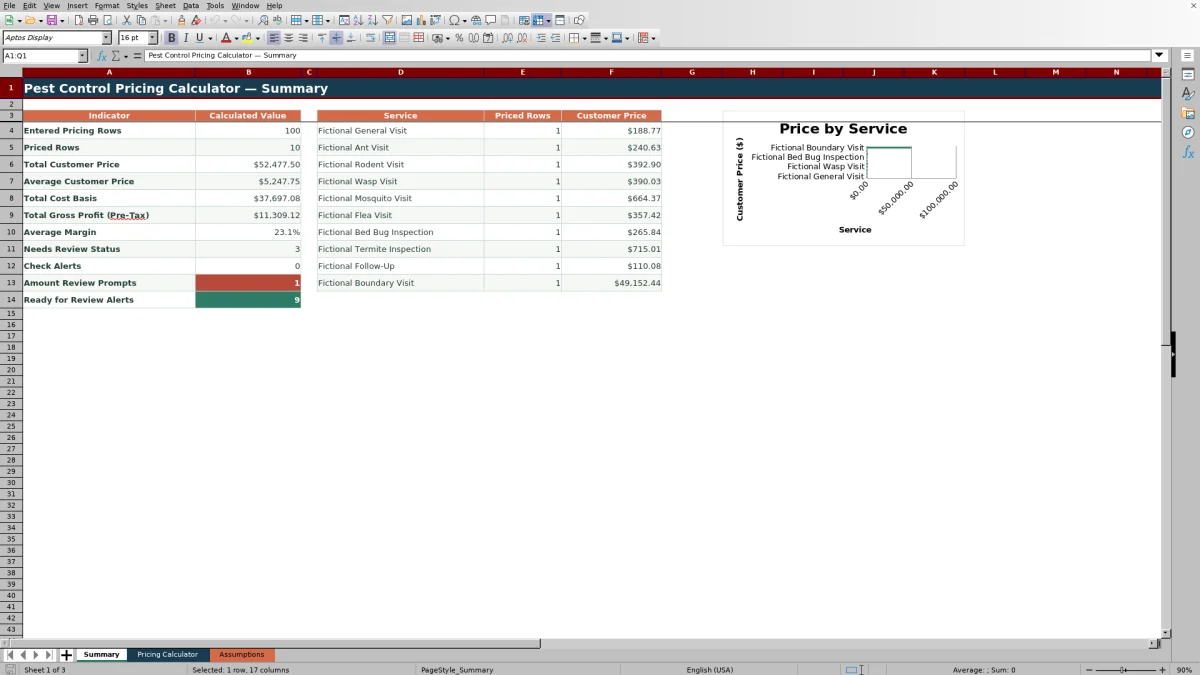
The Summary sheet counts entered and priced rows, totals customer prices and cost basis, calculates average customer price and margin, and reports gross profit before tax. It also counts selected workflow statuses and calculator alerts.
A separate service breakdown displays the number of priced rows and total customer price for each of the ten listed service choices. The included chart uses those service names and customer-price totals.
Workbook limits to consider
- The Pricing Calculator contains 100 entry rows, covering rows 5 through 104.
- Each service row has one product field with one quantity and one cost-per-ounce field.
- The shared labor, mileage, overhead, markup, and tax assumptions apply across calculator rows.
- The service and pest lists each provide ten choice positions, while the other dropdown lists use smaller fixed ranges.
- The date validator accepts dates from September 10, 2025, through September 10, 2027.
- The outputs are planning estimates and depend on the accuracy of the entered job data and assumption values.
Frequently asked questions
What costs does the pest control pricing calculator include?
It includes labor, product or material cost, mileage, other direct cost, overhead, markup, and optional tax. It also calculates cost basis, customer price, pre-tax gross profit, and margin.
How many service-pricing rows are available?
The Pricing Calculator provides 100 entry rows, covering rows 5 through 104.
Can I change the rates used by the calculator?
Yes. The visible Assumptions sheet stores the labor, mileage, overhead, markup, and tax rates used by the pricing formulas.
Can I change the dropdown choices?
Yes. The Assumptions sheet contains the source lists for services, pest concerns, technicians, products, routes, responsibilities, statuses, and tax choices.
Does the workbook flag incomplete entries?
Yes. Each pricing row includes a calculated alert that can identify missing required inputs, inconsistent product entries, and amounts that exceed limits stored on the Assumptions sheet.
What information appears on the Summary sheet?
The Summary sheet displays row counts, total and average customer prices, total cost basis, total pre-tax gross profit, average margin, alert counts, status counts, and service-level pricing totals.
Editorial responsibility

Maya EllisService workflow editor

Noah BennettWorkbook structure and operations