The Pest Control Service Plan Comparison Excel workbook organizes plan coverage, planned visit frequency, included response visits, response windows, add-ons, customer responsibilities, quote amounts, and workflow status in a consistent format.
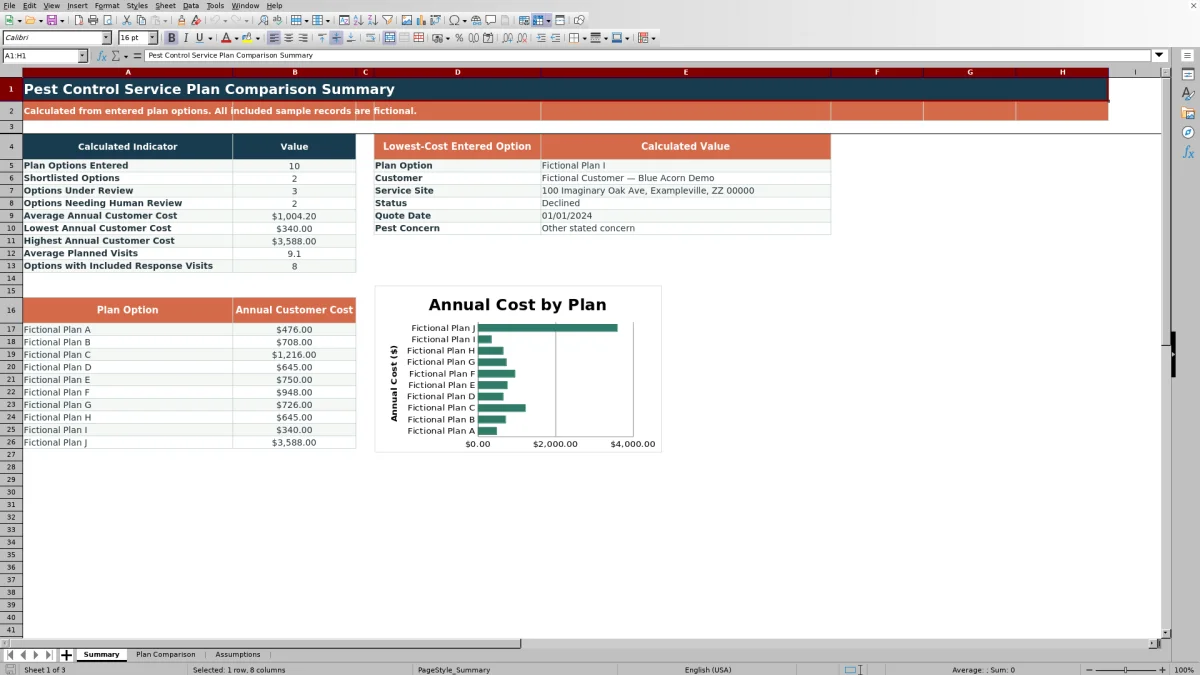
The XLSX annualizes recurring base and add-on quotes using editable billing-frequency multipliers. Its Summary sheet presents cost indicators, identifies the lowest-cost entered option, and charts annual customer costs for the first 10 plan rows.
How this workbook can help
- Convert monthly, quarterly, semiannual, and annual quotes into comparable annual customer costs.
- Keep coverage, visit frequency, response terms, add-ons, and customer responsibilities beside each quoted price.
- Separate annual base cost from annual add-on cost while also calculating total cost and cost per planned visit.
- Use status choices, filters, and summary indicators to organize up to 100 plan options.
What is in the file
How to get started
Confirm the assumptions
Review the billing frequencies, annual multipliers, list choices, and entry limits on the Assumptions sheet before entering current quotes.
Enter each plan option
Use one row per option on the Plan Comparison sheet. Record the customer, site, quote date, pest concern, coverage, visit counts, response window, base quote, add-on details, customer responsibility, and status.
Check the calculated costs
Confirm that the selected billing frequencies produce the expected annual base cost, annual add-on cost, annual customer cost, and cost per planned visit.
Compare the complete terms
Use the filters and Summary sheet to evaluate cost alongside coverage, planned visits, included response visits, response timing, add-ons, and customer responsibilities.
What the Workbook Compares
Each option can include its core service coverage, planned visits per year, included response visits, response window, quoted amount, billing frequency, add-on, customer responsibility, and status. The recurring amounts feed the calculated annual customer cost, allowing quotes with different billing schedules to share a common annual basis.
Evaluate Service Terms Alongside Price
The workbook keeps coverage and frequency visible beside calculated costs. This supports a factual comparison between what the customer is quoted, how many planned visits are listed, whether response visits are included, how quickly a response is stated, and which add-ons affect the annual total.
Worked Scenario for a Fictional Plan
Input: Fictional Plan Cedar has a base quote of $85 quarterly, a $20 monthly add-on, six planned visits, one included response visit, and a 48-hour response window.
Result: The quarterly base quote annualizes to $340, the monthly add-on annualizes to $240, and the annual customer cost is $580. Dividing $580 by six planned visits produces a cost per planned visit of $96.67.
Interpretation: The add-on contributes $240 to the annual total, while the cost-per-visit figure uses only the six planned visits as its denominator.
Next decision: Compare the $580 annual cost with the plan's stated coverage, response terms, customer responsibility, and competing options before changing its status.
Workbook and blank spreadsheet comparison
Use the prepared workbook when its verified fields and calculations fit the pest-control task. Start with a blank spreadsheet when you need a different model and can build and test every field and formula yourself.
| Method | Setup | Calculations and review | Practical fit |
|---|---|---|---|
| This Excel workbook | Use the prepared structure in the validated file | Review the documented calculations and results | Local editable pest-control workflow supported by the workbook |
| Blank spreadsheet | Create the structure yourself | Build and test every formula and check | A custom model built from scratch |
Common Entry Errors and Solutions
- If a quarterly amount is labeled Monthly, the workbook applies a multiplier of 12 instead of 4. Select the billing frequency shown in the quote.
- If an add-on is selected without both an amount and billing frequency, its annual cost cannot be completed. Enter both fields or select None.
- If planned visits are blank or zero, cost per planned visit remains blank. Enter the quoted annual visit count when available.
- If coverage or customer responsibility is vague, the price may calculate correctly while the operational comparison remains incomplete. Copy the relevant quoted terms into those fields.
Workbook Limits
- Annual totals depend on the entered amounts, selected billing frequencies, and editable multipliers.
- Cost per planned visit divides annual customer cost by planned visits only; included response visits are not part of that denominator.
- The Summary chart displays the first 10 plan-option rows, although the Plan Comparison sheet supports 100 rows.
- The lowest-cost summary returns the first option matching the minimum calculated annual customer cost.
- The workbook organizes entered quote information but does not verify provider statements or contract terms.
Move from Summary to Selection
Start with the Summary sheet to see option counts, average and range of annual customer cost, average planned visits, and the lowest-cost entered option. Then return to the corresponding Plan Comparison row to consider coverage, response terms, add-ons, and customer responsibilities before assigning a final workflow status.
Frequently asked questions
How many pest control plan options can the workbook compare?
The Plan Comparison sheet provides rows 5 through 104 for up to 100 plan options.
How does the workbook calculate annual customer cost?
It multiplies each recurring quote by the annual multiplier for its selected billing frequency. Annual base cost and annual add-on cost are then added together.
Can the workbook compare response terms?
Yes. Each plan row includes fields for included response visits per year and response window hours, allowing those terms to be viewed beside coverage and cost.
How are add-ons handled?
An add-on can have its own quoted amount and billing frequency. The workbook annualizes that amount separately, while selecting None produces an annual add-on cost of zero.
Does the Summary chart show all 100 options?
No. The chart is linked to the first 10 plan-option rows. The full comparison range and calculated cost columns remain available on the Plan Comparison sheet.
Editorial responsibility

Maya EllisService workflow editor

Noah BennettWorkbook structure and operations