This Excel workbook forecasts weekly pest control overtime hours and loaded labor costs by comparing route-level staffing demand with each technician’s regular capacity.
The XLSX includes a 120-line weekly forecast table, editable technician and cost assumptions, calculated staffing indicators, planning-status lists, and a summary of overtime cost by route.
How this workbook can help
- Converts forecast service and travel or administrative hours into weekly demand, overtime hours, and loaded overtime cost.
- Connects each selected technician with editable regular capacity and base hourly rate assumptions.
- Applies consistent overtime multiplier and payroll load assumptions across forecast entries.
- Summarizes demand, overtime exposure, planning status, and loaded overtime cost by route.
What is in the file
How to get started
1. Set the planning assumptions
Open the Assumptions sheet and confirm the overtime multiplier, payroll load rate, demand threshold, allowed forecast dates, and maximum hours per demand input.
2. Maintain technician and planning lists
Enter each technician’s regular capacity and base hourly rate, then maintain the route, forecast owner, and planning status lists used by the weekly entry fields.
3. Enter weekly staffing demand
On the Weekly Forecast sheet, select a week, route, technician, owner, and status. Enter forecast service hours and travel or administrative hours for each planned line.
4. Read the calculated forecast
Check total demand, regular capacity, forecast overtime hours, and loaded overtime cost on each line. Use the Summary sheet to assess totals and route-level cost before finalizing the staffing plan.
What the Pest Control Overtime Forecast Calculates
The workbook turns weekly pest control staffing inputs into three central measures. Total Demand Hours equals forecast service hours plus travel or administrative hours. Forecast OT Hours equals demand above the selected technician’s regular capacity, with a minimum of zero. Loaded OT Cost applies the technician’s base hourly rate, the shared overtime multiplier, and the payroll load rate to those overtime hours.
Weekly Inputs and Editable Assumptions
Each forecast line accepts a week start date, route, technician, forecast service hours, travel or administrative hours, forecast owner, and planning status. Formulas retrieve the selected technician’s regular capacity and base hourly rate from the Assumptions sheet.
Editable planning settings include a 1.5 overtime multiplier, an 18% payroll load rate, a 60-hour weekly demand threshold, forecast dates from July 13, 2026 through September 4, 2028, and an 80-hour maximum for one demand input. These are starting values and can be changed for internal planning.
Worked Pest Control Overtime Cost Scenario
Input: In a fictional weekly scenario, Jordan Vale has 45 forecast service hours and 7 travel or administrative hours. The technician assumptions provide 40 regular capacity hours, a $25.75 base hourly rate, a 1.5 overtime multiplier, and an 18% payroll load rate.
Result: Total demand is 52 hours, forecast overtime is 12 hours, and loaded overtime cost is $546.93 because 12 × $25.75 × 1.5 × 1.18 equals $546.93.
Interpretation: Twelve of the 52 demand hours exceed the entered regular capacity, so the row carries a projected loaded overtime cost rather than a zero-overtime result.
Next decision: The planner can compare the $546.93 estimate with the weekly labor plan and decide whether to retain the plan or revise the staffing forecast.
Reading the Summary and Route Cost View
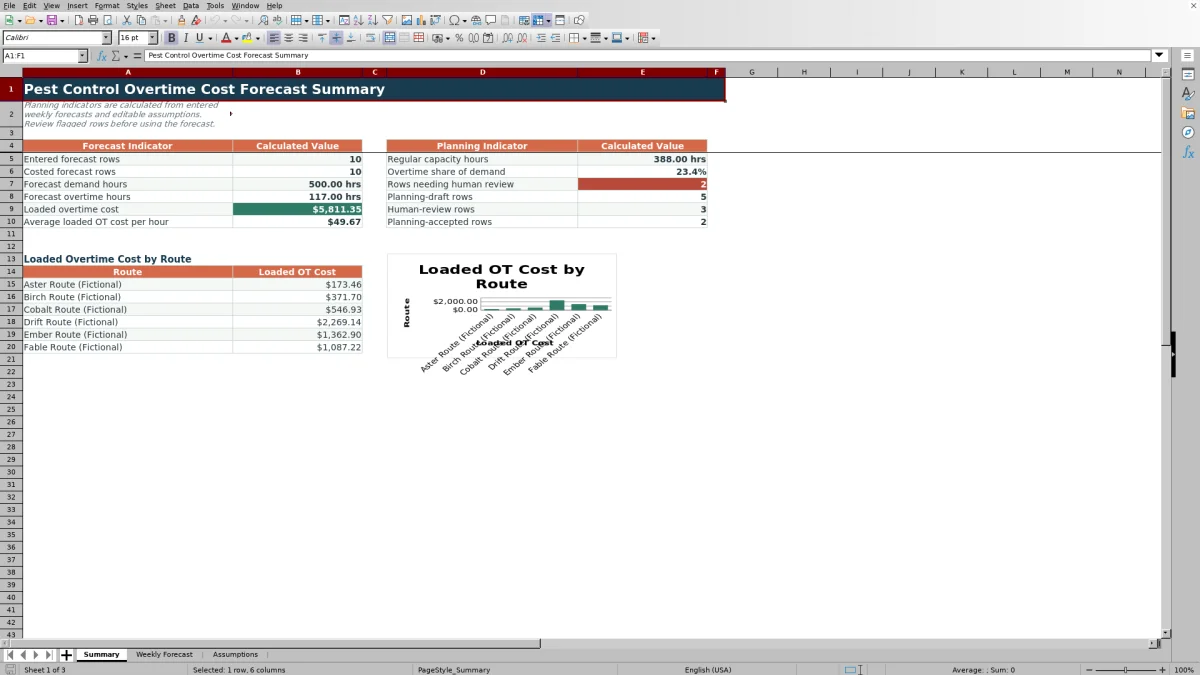
The Summary sheet reports entered and costed forecast rows, total demand hours, forecast overtime hours, loaded overtime cost, average loaded overtime cost per hour, and regular capacity hours. Overtime share of demand divides total forecast overtime hours by total demand hours.
Planning-status counts distinguish Planning Draft, Human Review, and Planning Accepted entries. The route section totals loaded overtime cost for the six route cells linked from Assumptions E12:E17 and uses those totals in the included chart.
Common Errors and Solutions
If calculated cells remain blank, complete the required week, technician, demand-hour, owner, and status entries, then confirm that the shared assumptions contain values.
If capacity or hourly rate is blank, select a technician listed in the assumptions table or add the technician’s planning values within that table.
If a date is rejected, enter a date within the earliest and latest forecast dates or update those editable date limits.
If an hour entry is rejected, correct the value so it falls between zero and the configured maximum, or update the maximum-hours assumption when the planning range changes.
If overtime is unexpectedly zero, confirm that total service and travel or administrative demand actually exceeds the technician’s regular capacity.
Workbook and blank spreadsheet comparison
Use the prepared workbook when its verified fields and calculations fit the pest-control task. Start with a blank spreadsheet when you need a different model and can build and test every field and formula yourself.
| Method | Setup | Calculations and review | Practical fit |
|---|---|---|---|
| This Excel workbook | Use the prepared structure in the validated file | Review the documented calculations and results | Local editable pest-control workflow supported by the workbook |
| Blank spreadsheet | Create the structure yourself | Build and test every formula and check | A custom model built from scratch |
Workbook Limits and Planning Boundaries
This workbook provides planning estimates rather than confirmed payroll results. Cost accuracy depends on the entered service demand, travel or administrative hours, regular capacity, base hourly rates, overtime multiplier, and payroll load rate.
The Weekly Forecast entry area contains 120 lines, from rows 3 through 122.
Date validation is controlled by the editable earliest and latest dates on the Assumptions sheet.
The route cost summary and chart use six route entries linked from Assumptions E12:E17.
Changing technician or shared cost assumptions changes calculated forecast results.
The workbook does not by itself confirm actual hours worked or amounts paid.
Frequently asked questions
How does the Excel workbook calculate pest control overtime hours?
It adds forecast service hours to travel or administrative hours, then subtracts the selected technician’s regular capacity. If demand does not exceed capacity, forecast overtime is zero.
How is loaded overtime cost calculated?
Loaded overtime cost equals forecast overtime hours multiplied by the technician’s base hourly rate, the overtime multiplier, and one plus the payroll load rate.
Which weekly forecast fields are entered manually?
Users enter or select the week start, route, technician, forecast service hours, travel or administrative hours, forecast owner, and planning status. Capacity, demand, overtime, rates, and loaded cost are formula-driven.
Can the overtime and technician assumptions be changed?
Yes. The Assumptions sheet contains editable values for the overtime multiplier, payroll load rate, date limits, maximum hours, technician capacity, base hourly rates, routes, owners, and planning statuses.
Does this workbook report actual payroll results?
No. It estimates overtime hours and loaded cost from weekly forecast inputs and editable assumptions. Actual recorded hours and paid amounts must come from the appropriate timekeeping or payroll records.
Editorial responsibility

Maya EllisService workflow editor

Noah BennettWorkbook structure and operations