The Pest Control Site Survey Worksheet for Excel organizes prospect and service-site details before a preliminary quote is prepared. The XLSX workbook captures survey dates, technicians, routes, pest concerns, requested services, site quantities, access constraints, survey hours, and preliminary quote amounts.
Use the Site Surveys sheet for entry, the Summary sheet for calculated sales indicators, and the Assumptions sheet for editable limits and list choices. The included customer, site, technician, route, and survey examples are fictional.
How this workbook can help
- Keep prospect, site, scheduling, quantity, access, and preliminary quote details in one workbook.
- Record each access constraint and identify the party responsible for resolving it.
- See calculated route miles and amount per unit alongside each completed survey entry.
- Monitor survey volume, workflow statuses, quote totals, hours, and route mileage from the Summary sheet.
What is in the file
How to get started
1. Configure the assumptions
Open the Assumptions sheet and update the planning limits, date range, technicians, routes, base miles, pest concerns, service choices, quantity units, access responsibilities, and statuses used by the workbook.
2. Enter the prospect survey
Add a unique survey ID, customer, service-site characteristics, survey date, technician, route, pest concern, requested service, site quantity, quantity unit, and survey hours on the Site Surveys sheet.
3. Document access and quote inputs
Describe any access constraint, select who is responsible for it, enter the preliminary quote amount when available, and choose the current survey status.
4. Correct flags and use the summary
Address messages in the Review Flag column, then open the Summary sheet to check status counts, access constraints, preliminary quote totals, average survey hours, average route miles, and quote dollars per survey hour.
Information Captured for Each Site Survey
The main sheet provides 100 survey rows, spanning rows 5 through 104. Each record can include a survey ID, customer, service-site characteristics, survey date, technician, route, pest concern, requested service, quantity, unit, access constraint, responsible party, survey hours, preliminary quote amount, and status.
Route Miles, Amount per Unit, and Review Flag complete the 18-column record. Filters cover the full entry range, while frozen panes keep the headers visible as the list grows.
Calculations and Entry Controls
Eleven validation rules support consistent entry. They cover the allowed survey-date range, three decimal inputs, and dropdown lists for technicians, routes, pest concerns, requested services, quantity units, access responsibilities, and statuses.
Formula columns look up base route miles from the Assumptions sheet, divide the preliminary quote amount by site quantity, and display record-level flags. The calculated cells remain blank when the inputs needed for their formulas are unavailable.
Worked Scenario: From Survey Entry to Quote Decision
Input: A fictional warehouse survey records 145 units, Fictional Route Indigo, three survey hours, a $2,350 preliminary quote, a rear-dock escort constraint, and Property Manager as the access responsibility.
Result: The route lookup returns 18.5 miles, and the amount-per-unit formula produces approximately $16.21 per unit.
Interpretation: The sales record now presents the expected route mileage and a normalized preliminary amount beside the site quantity and access details.
Next decision: Use those calculated values and the documented access responsibility to complete the quote workflow and update the survey status as appropriate.
Errors and Solutions
The Review Flag column provides actionable flags for several entry conditions.
- If “Duplicate ID” appears, replace the repeated survey ID with a unique value.
- If “Complete required fields” appears, fill in the missing customer, site, date, technician, route, concern, service, quantity, unit, survey-hours, or status entry.
- If “Assign access responsibility” appears, select a responsible party for the recorded access constraint.
- If “Check site quantity” appears, confirm whether the quantity should exceed the editable threshold on the Assumptions sheet.
- If a value is rejected during entry, use an available dropdown choice or enter a date or number within the configured limits.
Workbook Limits
The prepared entry area contains 100 survey rows. The route-mile formula looks up the four route choices and base-mile values supplied on the Assumptions sheet, so additional routes require corresponding assumption and formula-range changes.
Amount per unit depends on both site quantity and preliminary quote amount. Summary averages and ratios also depend on populated numeric entries, while preliminary quote amounts remain user-entered planning values.
Workbook and blank spreadsheet comparison
Use the prepared workbook when its verified fields and calculations fit the pest-control task. Start with a blank spreadsheet when you need a different model and can build and test every field and formula yourself.
| Method | Setup | Calculations and review | Practical fit |
|---|---|---|---|
| This Excel workbook | Use the prepared structure in the validated file | Review the documented calculations and results | Local editable pest-control workflow supported by the workbook |
| Blank spreadsheet | Create the structure yourself | Build and test every formula and check | A custom model built from scratch |
Summary Metrics for Sales Planning
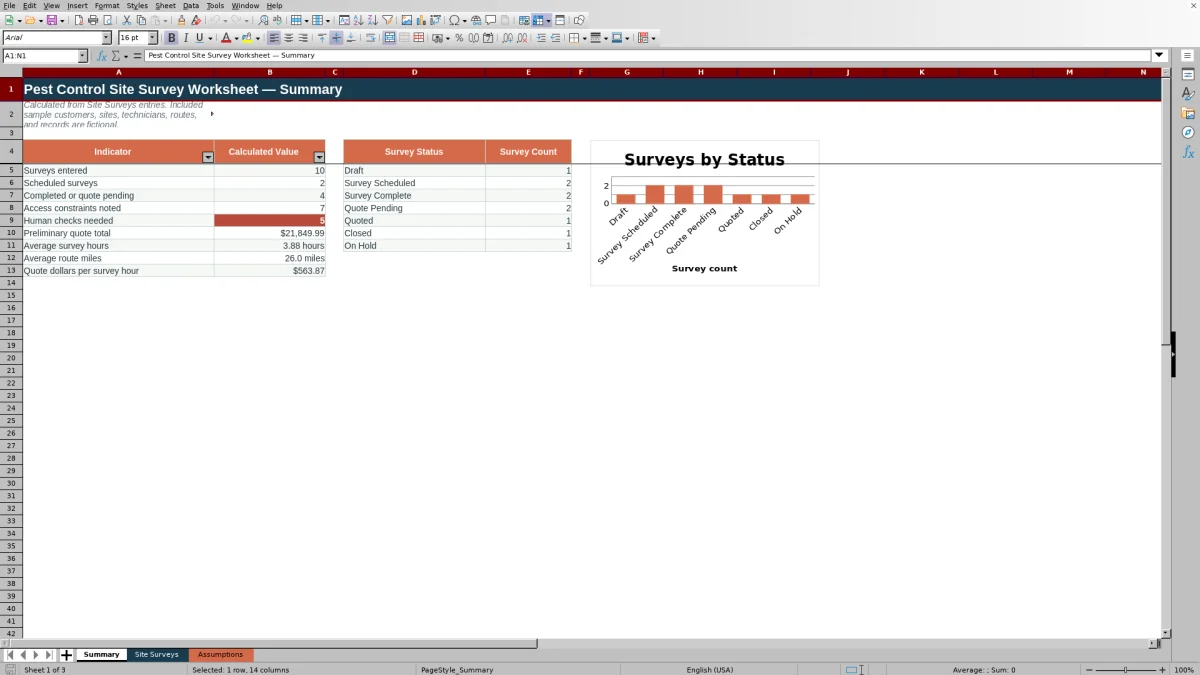
The Summary sheet provides a sales snapshot based on Site Surveys entries. It reports surveys entered, scheduled surveys, completed or quote-pending surveys, records with access constraints, flagged records, preliminary quote total, average survey hours, average route miles, and quote dollars per survey hour.
A separate status-count area uses the choices from the Assumptions sheet, and the included chart displays those counts for the seven configured statuses.
Frequently asked questions
What does the pest control site survey worksheet capture?
It captures prospect and service-site details, survey dates, technicians, routes, pest concerns, requested services, quantities, access constraints, access responsibilities, survey hours, preliminary quote amounts, and workflow statuses.
How many site surveys can the workbook hold?
The prepared Site Surveys entry area contains 100 rows, from row 5 through row 104.
Which values are calculated automatically?
The workbook calculates route miles from the selected route, amount per unit from preliminary quote amount and site quantity, record-level Review Flag messages, summary indicators, and survey counts by status.
Can the dropdown choices and planning limits be changed?
Yes. The Assumptions sheet contains editable limits and choices for dates, quantities, hours, quote amounts, statuses, units, technicians, routes, base miles, pest concerns, services, and access responsibilities.
What does the Summary sheet show?
It shows survey volume, selected workflow counts, access-constraint counts, flagged-record counts, preliminary quote totals, average survey hours, average route miles, quote dollars per survey hour, and a chart of survey counts by status.
Editorial responsibility

Maya EllisService workflow editor

Noah BennettWorkbook structure and operations